
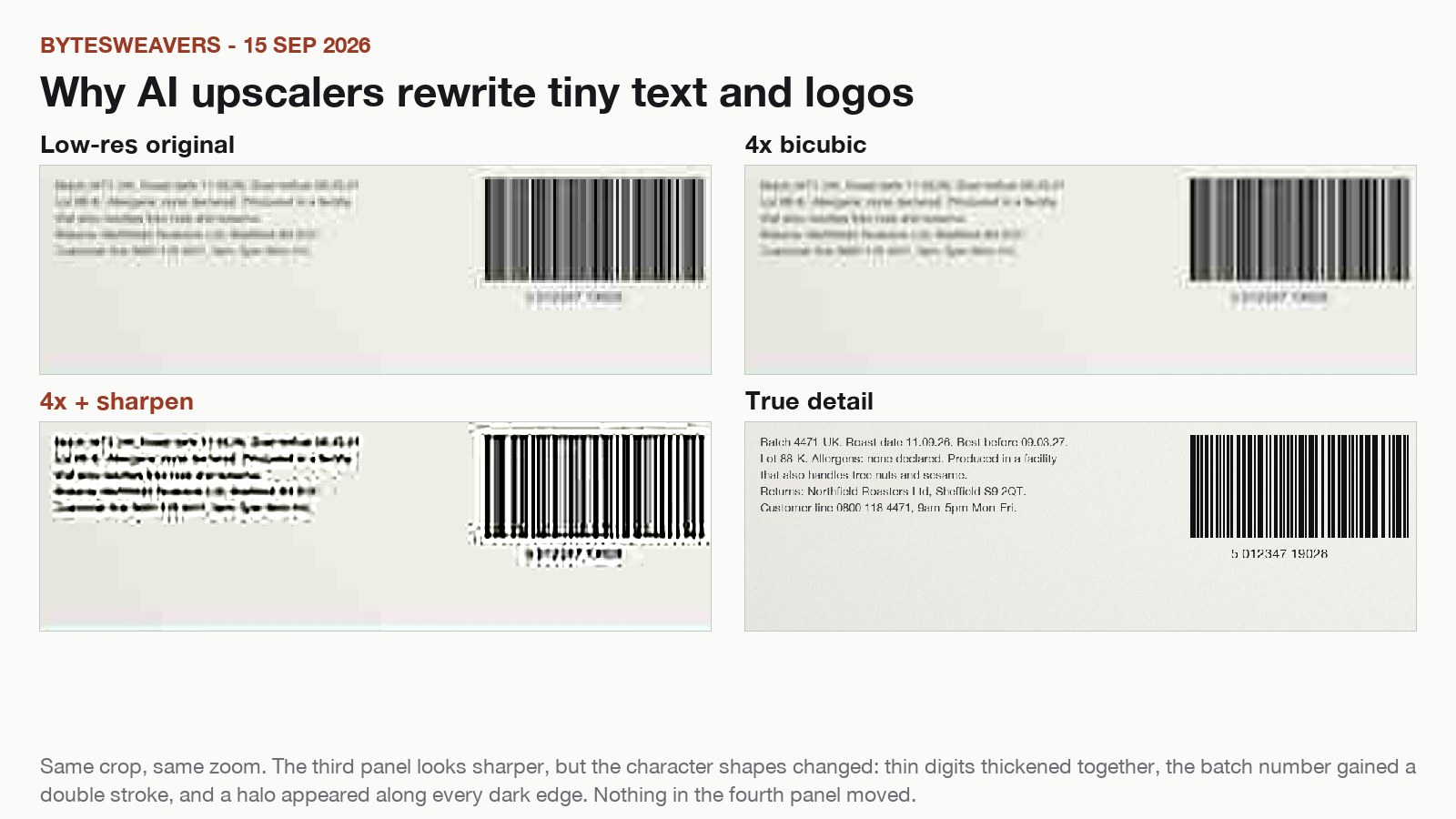
A photo can look clearly better after an AI upscale and still be wrong. The place it goes wrong most often is small text: a batch number, a serial, a price tag, a logo, a road sign. Those are usually the details people photograph in order to read them later, and they are the first thing an upscaler invents.
Three different things happen at once
Upscaling is often described as one operation. It is really three:
- Real detail is enlarged. Safe.
- Missing detail is estimated. This is a guess.
- Contrast is added to make the guess convincing. This is the part that hides the mistake.
At 4x, one source pixel becomes sixteen pixels. The model has to decide what those sixteen pixels are. On a face, a wrong guess reads as texture. On a character in a font, a wrong guess is a different character.
Run the matched-crop test
This takes a few minutes and tells you more than any before/after slider.
- Pick a photo with small text: a label, receipt, sign, logo or serial number.
- Read what you can at 100% before you change anything. Write it down if the text matters.
- Upscale once at 2x and once at 4x, same model, same settings, same file.
- Open original, 2x and 4x at 100% and crop the same small region in each. Compare character by character.
- Check three things: letter shapes, edges, and texture.
- Letter shapes. If two digits merge, or the inside of an O closes up, the scale was too high. Drop back to 2x.
- Edges. A bright halo or a flat grey band along dark edges means contrast was pushed past the real edge.
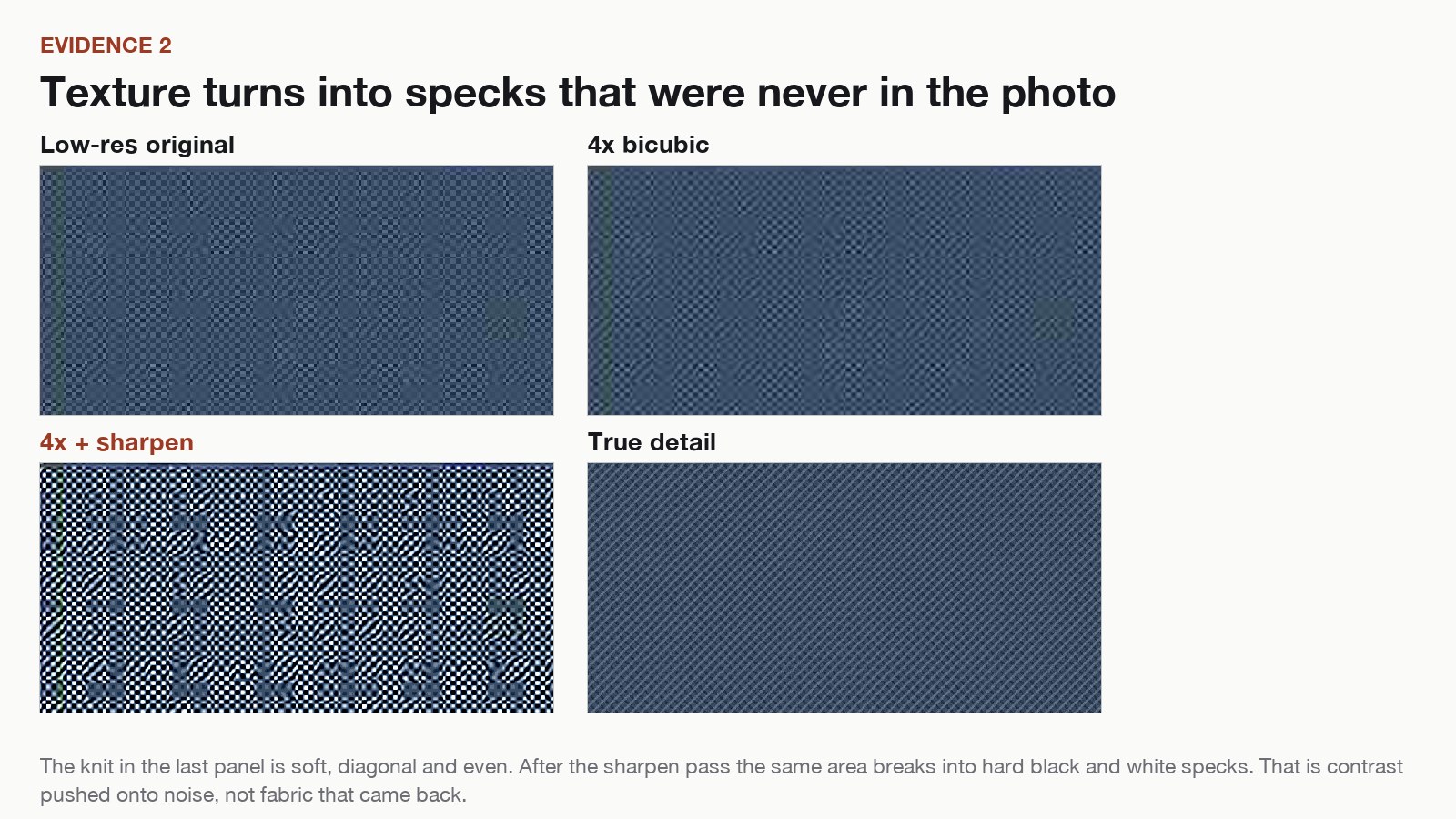
- Texture. Fine even texture should stay fine and even. Hard black and white specks in a smooth area are noise that got amplified.

Bicubic upscaling is a fair reference point in this test. It does not invent characters, so if it is easier to read than an AI result, the AI result has added something.
What different kinds of detail do
| Detail in the photo | Usually survives | Usually invented |
|---|---|---|
| Large shapes and blocks of colour | Yes | Little |
| Faces at normal distance | Mostly | Skin texture |
| Small text and numbers | Rarely | Character shapes, doubled strokes |
| Thin logo strokes | Rarely | Grey bands, closed counters |
| Fine even texture, like knit or mesh | Partly | Specks, pitting |
| Noise from a dark shot | No | New noise treated as detail |
Why phone photos are the hard case
A phone photo usually arrives already compressed, slightly soft, and grainy in low light. That matters because the model cannot tell grain from texture. Both look like high-frequency detail, so sharpening amplifies both at the same time.
That is why a night shot of a sign often looks worse after upscaling than the same sign in daylight. The input carried less real detail and more noise, and the tail end of the pipeline rewarded the noise.
How to upscale a photo offline on Android
If the photo is private, the simplest option is to run the upscale on the phone and skip the upload step entirely.
- Install an offline upscaler. Offline AI Image Upscaler processes the image on the device.
- Choose the file and pick 2x or 4x. Start at 2x when there is any text or logo in the frame.
- Run the export, then open it at 100% and repeat the character comparison from the matched-crop test before you send or post it.
The same habit applies to desktop tools, including the Bytesweavers image upscaler guide. The test is the same; only the hardware changes.
When not to upscale at all
If the text is going to be used for a decision, do not take it from an enlarged copy. An invoice total, a medicine label, a part number or a meter reading should be read from the original file, or photographed again. An upscaled image is a presentation asset, not evidence.
The honest limit
Upscaling can make a wall photo usable and a product shot presentable. It cannot recover characters that the sensor never recorded. Some low-resolution text has no correct answer left in the file, and any tool that produces a confident one is guessing.
So look at the letters before you look at the whole image. If the characters survived, the upscale is doing its job. If they changed shape, you have a sharper picture of something that was never written.
Disclosure: the Android app linked above is a Bytesweavers product. The test photos used here are an authored test scene, published so the comparison can be checked.
