Offline Speaker Diarization: How to Separate Speakers in a Meeting Transcript
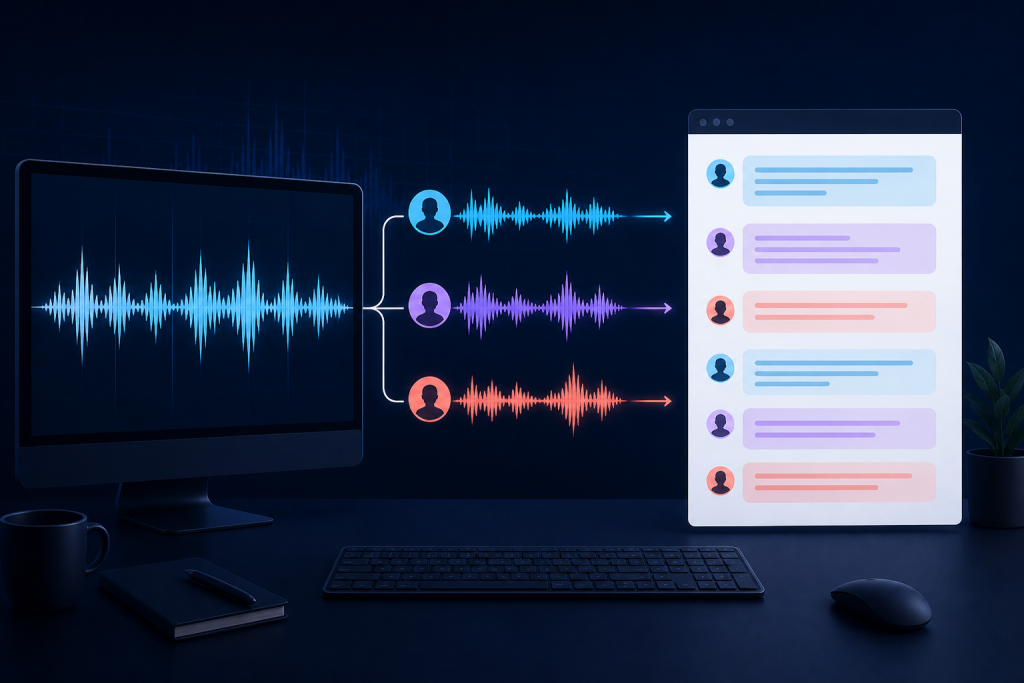
A transcript tells you what was said. Speaker diarization adds the missing structure: who spoke when. For interviews, meetings, podcasts, and research recordings, that distinction can turn an unreadable wall of text into a document people can actually review.
Offline speaker diarization processes the recording on your computer instead of uploading it to a transcription service. That can reduce unnecessary data exposure and make repeated experiments easier. It does not make speaker labels automatically correct, however. Recording quality, overlapping speech, speaker count, and review all matter.
What speaker diarization does
Diarization divides audio into speech segments and groups segments that appear to come from the same voice. The initial result normally uses anonymous labels such as Speaker 1, Speaker 2, and Speaker 3. A reviewer then maps those clusters to real names where appropriate.
Diarization is different from speech recognition. Speech recognition converts audio into words. Diarization estimates speaker turns. A complete meeting transcript aligns the two outputs so every sentence has both text and a speaker label.
| Task | Question answered | Typical output |
|---|---|---|
| Speech detection | Where is speech present? | Speech time ranges |
| Transcription | What was said? | Words and timestamps |
| Diarization | Who spoke when? | Speaker-labelled segments |
| Identification | Which known person is this? | Names or enrolled identities |
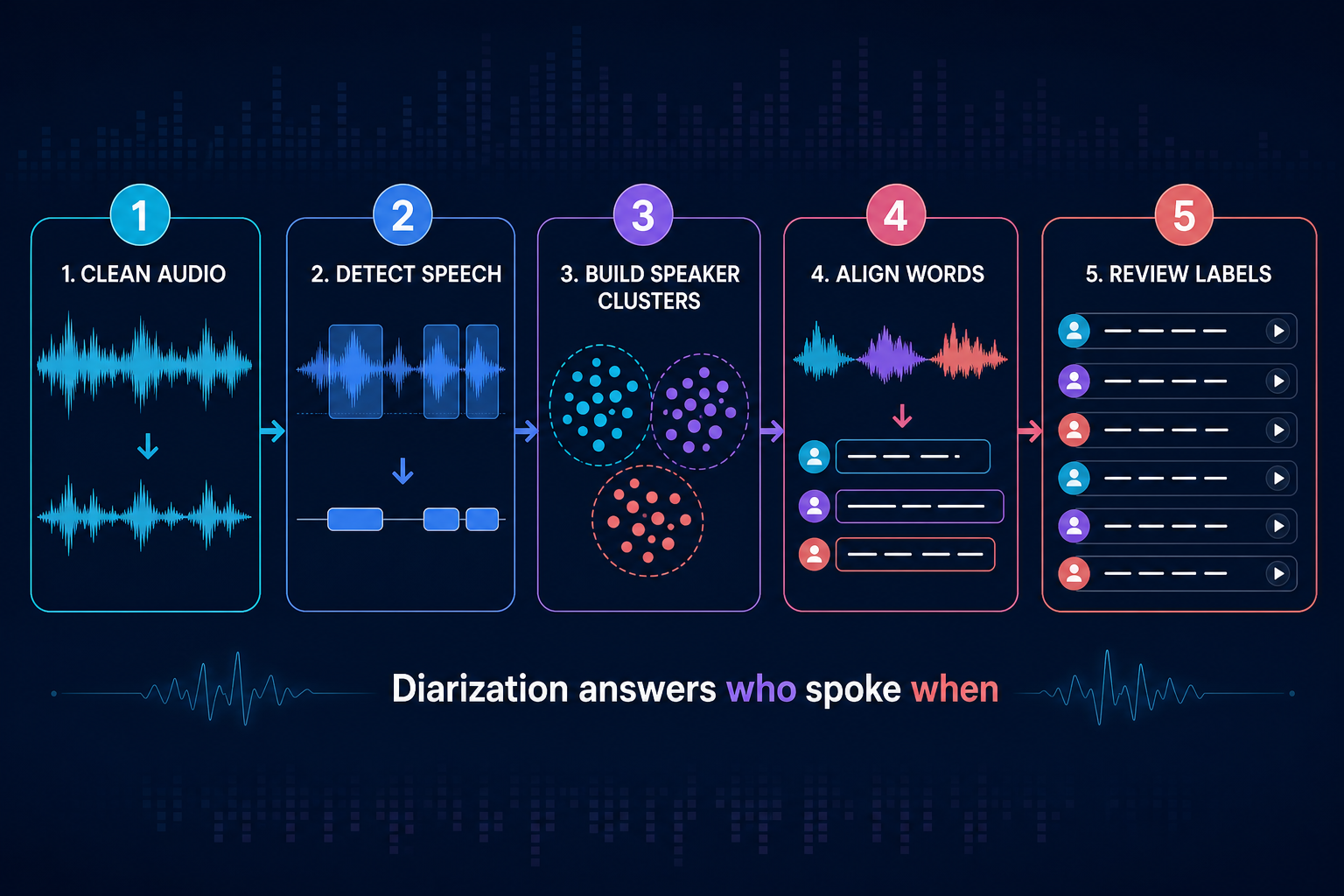
How offline speaker diarization works
1. Prepare the recording
Use the highest-quality original available. Avoid processing a recording that has been repeatedly compressed. Convert unusual formats only when necessary and preserve the original file. A consistent sample rate and clean mono or stereo track usually simplifies processing.
2. Detect speech
Voice activity detection finds regions that contain speech and ignores long silence or non-speech audio. Poor detection can cut off quiet words or include music and room noise, so this stage affects every later result.
3. Create voice representations
The diarization model converts short speech regions into numerical voice representations. Segments that sound similar should sit closer together than segments from different speakers. Noise, whispered speech, telephone audio, and strong emotion can make one person appear inconsistent.
4. Cluster speaker segments
A clustering step groups the representations into estimated speakers. If you know the expected number of participants, providing that value can prevent the system from inventing too many speakers or merging distinct voices.
5. Align speakers with words
The speaker timeline is aligned with word or sentence timestamps from transcription. Boundaries rarely match perfectly. Short acknowledgements such as “yes” or “right” can be assigned to the neighbouring speaker, especially during interruptions.
How to improve speaker separation
Record close to the voices
Distance creates room reflections and reduces the differences between voices. A central laptop microphone may work for a quiet two-person meeting, but separate microphones or a properly placed conference microphone usually produce more reliable speaker turns.
Reduce overlapping speech
Two people speaking simultaneously is one of the hardest cases. Traditional diarization may choose the louder person, switch labels rapidly, or assign the overlap to one cluster. Encourage turn-taking when the transcript is important and flag unavoidable overlap for manual review.
Use the expected speaker count
When the application supports minimum, maximum, or exact speaker counts, use information you genuinely know. Do not force three speakers merely because three names appear on an invitation; someone may not attend, or another participant may join.
Keep enough speech context
Very short fragments provide little voice information. Longer uninterrupted turns are easier to cluster. Aggressive silence removal before diarization can damage timing and create unnatural boundaries, so diarize the original or lightly cleaned recording first.
Clean steady noise carefully
Moderate noise reduction can help with fan noise or hum, but heavy denoise may alter vocal characteristics. Compare diarization on the original and cleaned versions when the recording is difficult.
Common errors and what they mean
- One person becomes two speakers: their audio conditions changed, or clustering was too sensitive.
- Two people become one speaker: voices are similar, segments are short, or the estimated speaker count is too low.
- Labels swap halfway through: anonymous clusters are consistent locally but were mapped to names incorrectly.
- Short replies get the wrong label: word and speaker boundaries overlap.
- Remote guests are grouped together: conferencing software applied similar compression to multiple participants.
- Music becomes a speaker: speech detection included non-speech regions.
A practical review workflow
Never rename every speaker immediately. First listen to a clear, long segment from each cluster. Map only confident clusters to names. Then scan every label transition while following the waveform and transcript. Pay special attention to the first minute, interruptions, short confirmations, and sections after a microphone or network change.
Keep an “Unknown speaker” label when the evidence is insufficient. A transparent unknown is better than a confident but incorrect attribution. For legal, medical, disciplinary, or high-stakes use, treat automatic labels as draft assistance and apply the organisation’s required human-verification process.
Offline privacy considerations
Local processing keeps the audio and intermediate models on the device, but privacy still depends on the whole workflow. Store recordings in an appropriate location, restrict access, remove temporary exports, and understand whether model downloads or diagnostics contact external services. Check consent and recording laws for every participant and jurisdiction.
Export formats
Use DOCX or PDF when people need a readable meeting document. Use SRT or VTT when speaker-labelled captions will accompany audio or video. Use JSON or CSV when another system needs timestamps, cluster identifiers, and confidence data. Preserve timestamps during editing so reviewers can return to the exact audio.
Final checklist
- Keep the original recording.
- Use close, consistent microphones where possible.
- Set the expected speaker count only when known.
- Avoid aggressive silence removal before diarization.
- Review overlaps and short replies manually.
- Map anonymous clusters to names using clear segments.
- Keep unknown labels when evidence is weak.
- Verify high-stakes transcripts with a human reviewer.
Bytesweavers’ Video to Text Transcriber supports private local transcription workflows on Windows. For audio-focused work, see AI Audio to Text Generator Pro. Test with one representative recording before processing a full archive.

Writes guides and product notes for Bytesweavers.