Chrome Extension Side Panel vs Popup: Which UX Fits Manifest V3?
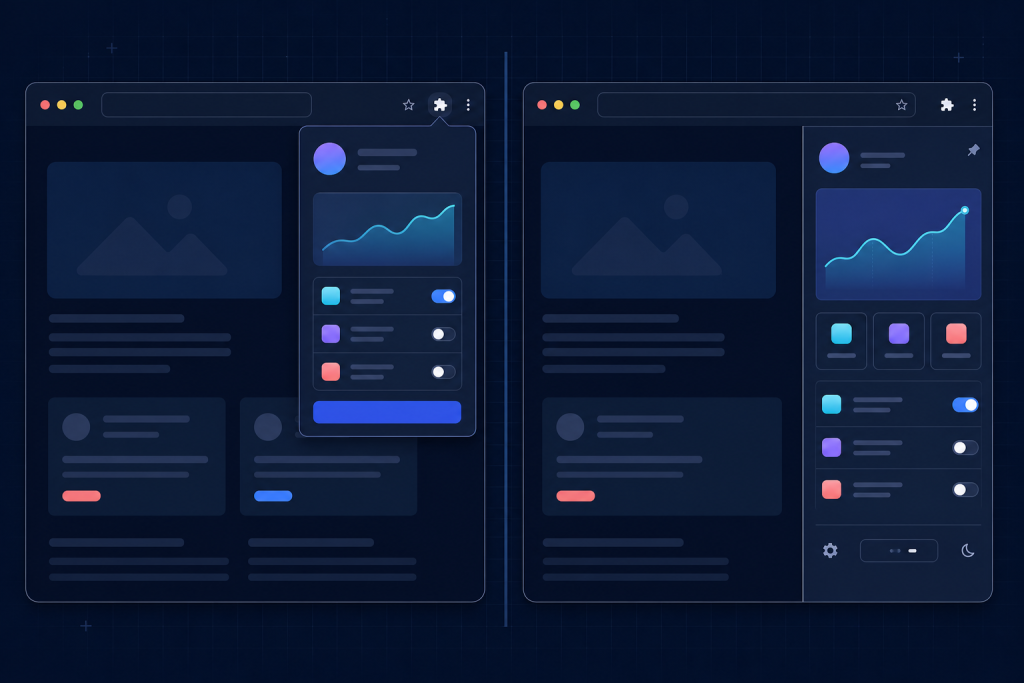
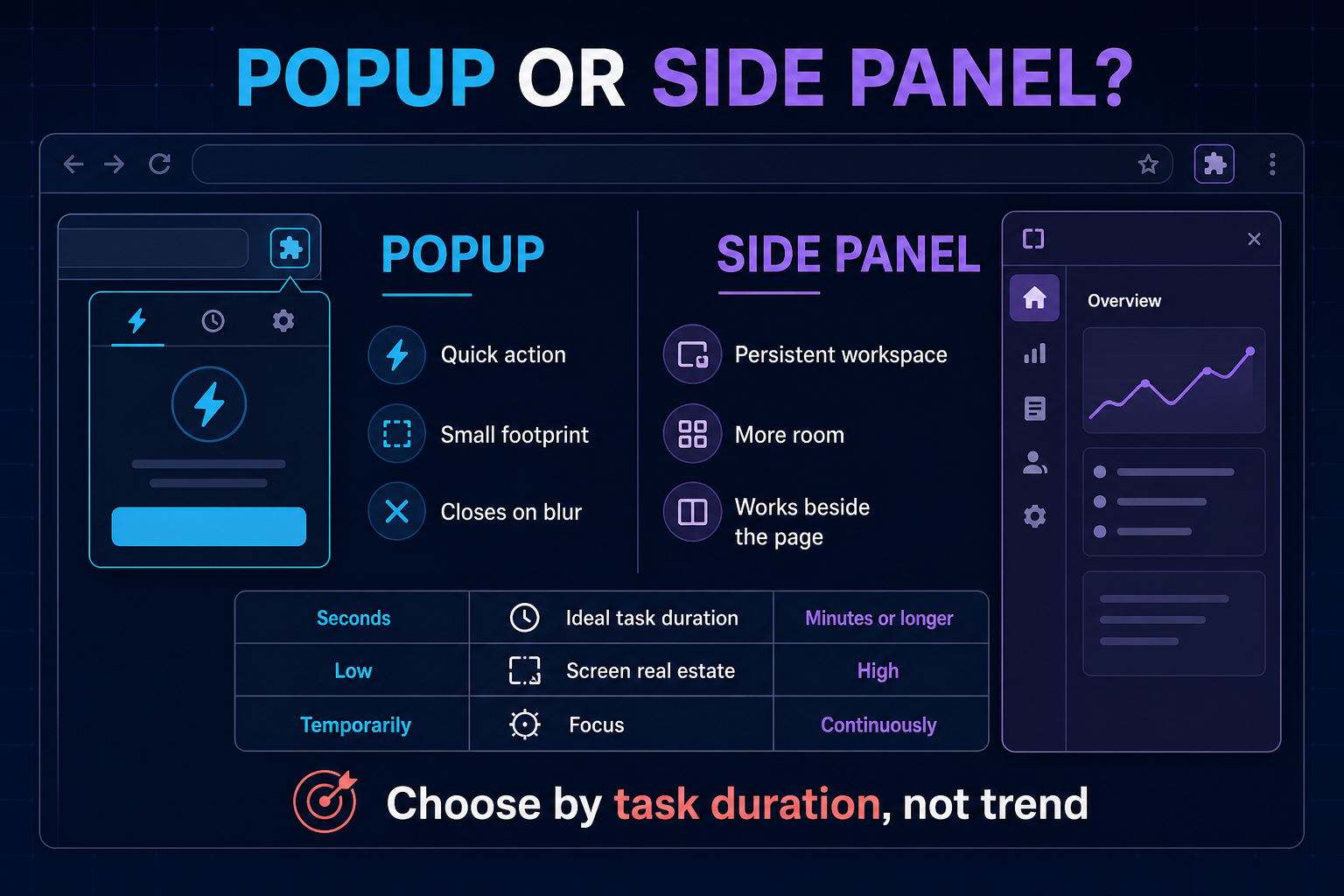
A Chrome extension popup and a side panel can expose the same features, yet they create very different experiences. A popup is ideal for a quick action that finishes in seconds. A side panel is better when users need a persistent workspace while reading, comparing, writing, or navigating across pages.
The right choice for a Manifest V3 extension depends less on visual fashion and more on task duration, required context, and how often the interface must survive a page change. This comparison explains the tradeoffs and provides a practical decision framework.
Quick decision
Choose a popup when the main job is a compact command: save the current page, toggle a setting, copy a value, start a capture, or show a short status. Choose a side panel when the extension needs sustained interaction: research notes, AI assistance, page analysis, multi-step forms, reading lists, or controls that must remain visible beside the webpage.
| Question | Popup | Side panel |
|---|---|---|
| Typical task duration | Seconds | Minutes or longer |
| Available space | Compact | Taller persistent surface |
| Survives focus change | No; usually closes | Yes |
| Works beside page content | Temporarily overlays it | Yes |
| Best for | Commands and status | Workflows and reference |
| Implementation complexity | Usually lower | More state and lifecycle design |
How extension popups behave
A popup opens from the extension action in the browser toolbar. It is familiar, fast, and easy to discover after installation. Because it appears close to the icon that launched it, users understand it as a temporary control surface.
The limitation is equally important: the popup normally closes when it loses focus. Clicking the webpage, opening developer tools, switching windows, or choosing certain browser controls can dismiss it. Any unfinished input needs to be saved before that happens. A popup should therefore avoid long forms, multi-step editing, and workflows that depend on comparing the interface with several parts of the page.
Good popup use cases
- Save or bookmark the current page.
- Toggle one or two extension settings.
- Display a short account or sync status.
- Copy a generated value to the clipboard.
- Start a page-specific action.
- Choose from a small number of modes.
A well-designed popup should make its primary action obvious without scrolling. It should also recover safely if it closes: save drafts, keep expensive results outside the popup document, and show clear progress when a background operation continues.
How the side panel changes the workflow
The side panel gives an extension a persistent surface alongside the current page. This is useful when the webpage is part of the task rather than merely the place where the task begins. Users can reference page content while working with controls, notes, summaries, results, or navigation in the panel.
More room does not automatically produce a better interface. A side panel still has constrained width, so desktop layouts with wide tables or multiple columns often fail. The best side panels use a narrow, responsive information hierarchy and reserve the vertical dimension for history, sections, and progressive disclosure.
Good side-panel use cases
- Research notes that follow the user across pages.
- AI chat grounded in the active tab.
- Accessibility or reading controls used continuously.
- Page audits with expandable findings.
- Multi-step data collection and review.
- Reference material needed while writing or comparing.
Manifest V3 architecture considerations
Both surfaces should be treated as views over extension state, not as the only place where that state exists. Manifest V3 service workers can stop when idle, popups can close at any moment, and tabs can navigate. Durable information belongs in an appropriate storage layer; transient UI state should be recoverable.
State and lifecycle
A popup has a short lifecycle, so initialise only what is needed and avoid assuming the document remains open. A side panel may live longer, but it still needs to respond to active-tab changes, permission changes, and page navigation. Separate business logic from rendering so the same operations can be invoked reliably from either surface.
Permissions
Do not request broad host access merely because a side panel can display information from many sites. Ask for the smallest permission set that supports the feature, explain why access is needed, and provide a useful state when access is unavailable. Optional permissions can keep installation less intimidating.
Messaging
Use clear messages between the popup or panel, the service worker, and content scripts. Define request and response shapes, handle missing tabs and closed documents, and surface errors in plain language. Long-running operations should not depend on a popup staying open.
UX criteria that should decide the surface
1. How long does the task take?
If a normal user completes the job in under ten seconds, a popup is usually efficient. If the user reads, edits, compares, waits, or repeats steps, the side panel is less fragile.
2. Does the user need the page at the same time?
A side panel is valuable when users continually reference the webpage. A popup can obscure content and disappears when the user clicks outside it.
3. How much information must remain visible?
Short status and a few controls fit a popup. History, citations, grouped results, and multi-step progress usually need the side panel’s vertical space.
4. Is interruption expensive?
If accidental closure would lose a draft or force a restart, either persist every change aggressively or use a more durable surface. Never make the user learn the popup lifecycle through lost work.
5. Can one surface launch the other?
A hybrid design is often strongest. The popup can provide one-click actions and an “Open workspace” command, while the side panel handles extended work. Avoid duplicating every setting in both places; assign each surface a clear job.
Common design mistakes
- Putting a desktop dashboard in a popup: the result becomes cramped, scroll-heavy, and easy to dismiss.
- Using a side panel for one toggle: the persistent surface adds weight without value.
- Keeping critical state only in the DOM: closure or navigation destroys user work.
- Ignoring narrow widths: wide tables, fixed cards, and long unbroken text become unusable.
- Requesting excessive permissions: unnecessary access damages trust and reviewability.
- Duplicating two full interfaces: maintenance grows while users face inconsistent behaviour.
Test with realistic tasks
Prototype both surfaces before committing. Give users a realistic page and ask them to complete the core job. Measure completion time, accidental dismissals, backtracking, and whether they need to keep reopening the interface. A five-minute workflow may look acceptable in a static popup mockup but feel frustrating in actual browser use.
Test keyboard navigation, zoom, high-contrast settings, long translated strings, narrow windows, restricted pages, missing permissions, offline states, and service-worker restarts. Store review is easier when the extension’s purpose, permission use, and user controls are clear.
Recommendation
Use the popup as a launcher and quick-command surface. Use the side panel as a persistent workspace. If the extension has only one short action, keep it simple with a popup. If the extension helps users think, compare, or create alongside a webpage, the side panel is usually the better foundation.
Bytesweavers provides Chrome extension development and broader browser extension development. A good project begins by mapping the core task and permission model before choosing the interface surface.

Writes guides and product notes for Bytesweavers.