Turn a photo into a video on your Mac, offline (and what your RAM allows)

One photo in, a short clip out — on your own Mac
Image to video takes a single still frame and animates it. In Local AI Video Generator Pro you pick a photo, describe the motion in words, and the model runs locally. Nothing is uploaded to a server.

First, check what your Mac can actually run
The app reads your hardware and compares each model against your Mac’s total unified memory, not the memory that happens to be free. On a 16 GB Apple-silicon Mac, LTX 2.3 Q4 needs 16 GB and about 27 GB of disk, so it fits. LTX 2.3 Q8 needs 32 GB, so the library marks it incompatible — that is the machine, not a missing file. Free memory only changes the app’s speed advice.
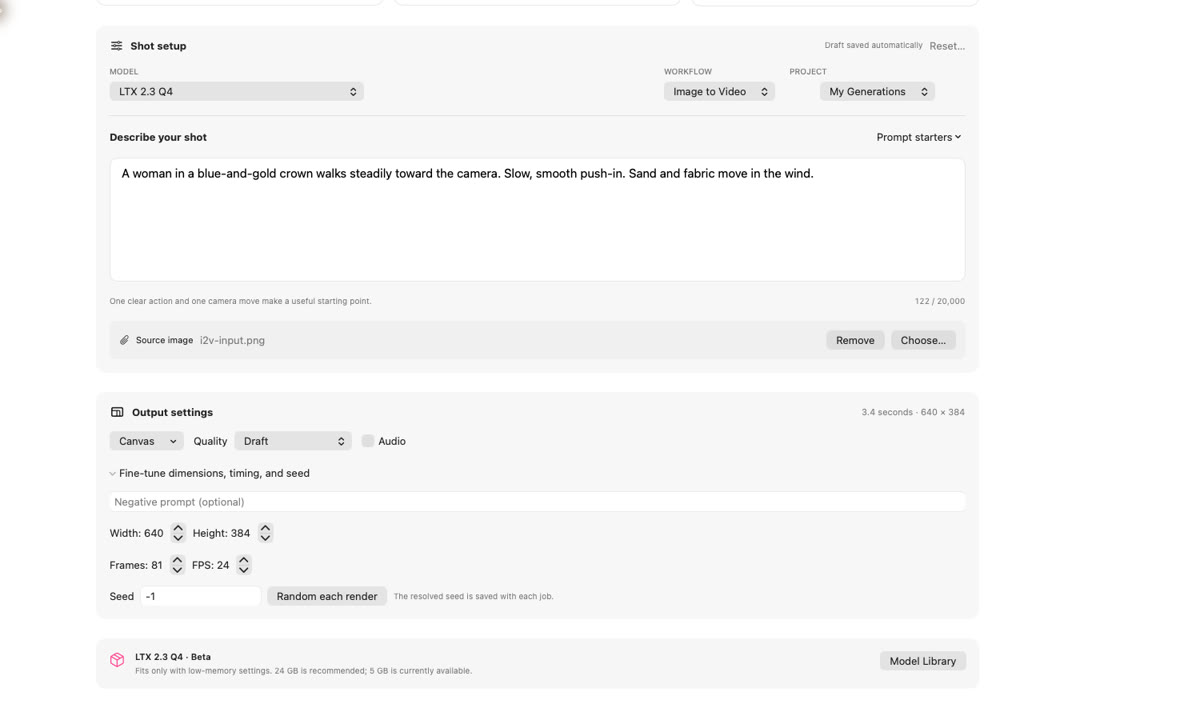
Step 1: choose Image to Video
Open the workflow menu and switch from Text to Video to Image to Video.
Step 2: choose the photo
One clear subject works best: a face, a car, a product, or a strong shape. Skip photos with heavy motion blur, because the model animates the blur along with everything else.
Step 3: describe the move
Use three parts: the subject, one action, and one camera move.
A woman in a blue and gold crown walks steadily toward the camera. Slow, smooth push in.
Settings that keep a first test small
Start on Draft: 640 × 384, 81 frames, 24 fps. Leave the seed at -1 for a new result each time; set a fixed seed for a repeatable take.

What image to video will not do
- It will not rescue a soft or badly blurred photo.
- It will not give you long takes; you get a few seconds per clip.
- Faces and hands can drift when the motion is too big.
- More memory changes the speed, not the model’s minimum.
An honest note about the sample
The stills and the clip come from Comfy Org’s official LTX-2.3 image-to-video demo, MIT-licensed, photo AI-generated. It was not rendered inside the app. The app screens are real captures.
Local AI Video Generator Pro is on the Mac App Store; the free plan gives three completed renders every seven days.

Writes guides and product notes for Bytesweavers.