
Offline Image Compressor
Shrink photos by up to 90%, convert formats, and free up iPhone storage — all 100% offline and private.
iPhone & iPad App • HEIC / JPEG / PNG • Batch up to 30 Images • No Cloud Uploads
Download on the App Store
Free to start — compress, resize, and convert single images instantly. Upgrade for batch processing.
Download Free — Single Image Compression Go Bulk Premium — $3.99/mo or $19.99/yrNo Cloud Uploads Only 1.7 MB iOS 17.0+
Maximum file size reduction possible
Images processed at once in batch mode
Formats supported — HEIC, JPEG, PNG
Tiny app size — installs in seconds
Free Up iPhone Storage — Instantly & Privately
Running out of iPhone storage? Need to shrink a photo to send in an email or upload to a website? Offline Image Compressor reduces photo file sizes by up to 90% without sacrificing visible quality — and unlike other apps, it does this entirely on your device with zero cloud uploads.
Whether you need to quickly compress a single photo or batch-process dozens of images at once, this lightweight 1.7 MB app handles it all — with a full format converter, pixel resizer, before/after file size stats, and a handy history log of everything you’ve compressed.
Free & Bulk Premium Plans
Start compressing for free with no image limits on single files. Upgrade to Bulk Premium to batch-process up to 30 images at once.
Free
No credit card. Download and compress immediately.
- Compress single images — no daily limit
- Resize pixel dimensions
- Convert between HEIC, JPEG & PNG
- Before & after file size comparison
- Import from Photos, Files, or Camera
- Export to Photos or Share Sheet
- Quick history log of recent compressions
- 100% offline & private
Bulk Premium
or $19.99/year (save 58%)
Auto-renewing. Manage anytime via App Store.
- Everything in the Free plan
- Batch Compression: select up to 30 images at once
- Apply the same settings across all selected images simultaneously
- Auto-Save: batch compress entire albums and save directly to Photos
- Maximum time savings for bulk storage cleanup
- Priority feature updates
Key Features
100% Offline & Private
Unlike apps that upload your photos to remote servers, every byte of processing happens locally on your device. No internet connection required, no data collected, your photos stay strictly on your phone.
Up to 90% Size Reduction
Watch multi-megabyte photos shrink into tiny kilobytes in seconds. Instantly see the before and after file sizes and the exact percentage of storage you saved on each image.
Format Converter
Apple’s HEIC format is great but doesn’t work everywhere. Easily convert between HEIC, JPEG, and PNG — in either direction — to make your photos compatible with any platform or service.
Pixel Resizer
Reduce the physical dimensions of your images alongside file size compression. Perfect for social media uploads, email attachments, and web publishing where specific pixel dimensions are required.
In-Depth Settings
Fine-tune compression quality, target output dimensions, and output format to match your exact requirements — whether you need maximum compression or a careful balance of size and quality.
Compression History
A quick history log keeps track of your recently compressed images and shows exactly how much space you saved — so you always know the impact of your storage cleanup efforts.
Batch Compression Bulk
Select up to 30 images at once and compress them all simultaneously with the same settings — the ultimate time-saver for cleaning up your Camera Roll or processing entire photo sessions.
Auto-Save to Photos Bulk
Batch compress entire albums and automatically save every compressed result directly back to your Photos library in one tap — no manual export required for each image.
Screenshots
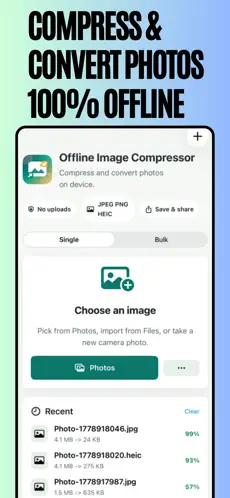
Compress Offline
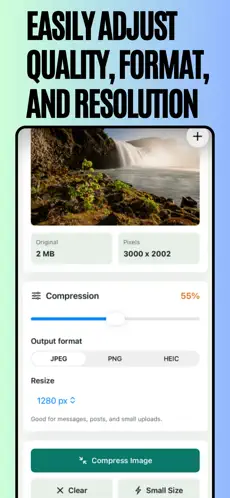
In-Depth Settings
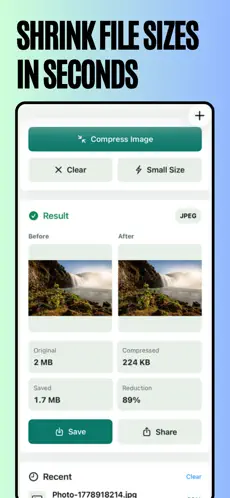
Shrink in Seconds
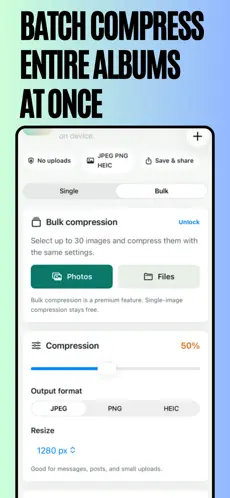
Batch Compress
Who is it For?
- iPhone Users Running Low on Storage: Reclaim gigabytes by shrinking your existing photo library without deleting anything.
- Content Creators: Quickly resize and convert photos for social media, thumbnails, and platform-specific upload requirements.
- Business & Professional Users: Compress client photos and documents before emailing or uploading to web portals.
- Travellers: Free up space on the go before shooting more photos — without needing Wi-Fi or cloud access.
- Privacy-Conscious Users: Handle personal photos without trusting any third-party cloud service.
App Details & Requirements
- Platform: iPhone & iPad
- iOS: iOS 17.0 or later required
- Size: Only 1.7 MB
- Price: Free — Bulk Premium $3.99/mo or $19.99/yr
- Age Rating: 4+
- Developer: Manish Kapoor / Bytesweavers
- Category: Photo & Video
Frequently Asked Questions
Are my photos uploaded anywhere?
Never. The developer has confirmed that no data is collected. Unlike cloud-based compression tools, every operation runs entirely on your iPhone or iPad. Your photos never leave your device.
Does compressing an image reduce its quality?
The app uses smart JPEG quality reduction to shrink file sizes while keeping the visual quality acceptable for most uses. The before and after file size display lets you see exactly what you’re trading — full control is always in your hands via the quality slider in Settings.
What is the difference between the free plan and Bulk Premium?
The free plan lets you compress, resize, and convert individual images with no daily limit. Bulk Premium ($3.99/month or $19.99/year) unlocks batch mode — select up to 30 images at once and process them all simultaneously — plus Auto-Save for saving batch results directly back to your Photos library.
Why should I convert from HEIC to JPEG?
HEIC is Apple’s space-efficient default format, but it is not universally supported — many websites, Windows PCs, and older software cannot open HEIC files. Converting to JPEG ensures maximum compatibility for sharing, uploading, and printing.
Can I cancel my Bulk Premium subscription?
Yes. Subscriptions are managed through your Apple Account in the App Store and can be cancelled at any time. You retain Bulk Premium access until the end of your current billing period, then revert to the free single-image plan.
Free Up Your iPhone Storage Today
Compress, convert, and resize photos privately on your device — free to start, no cloud required.
Download Free on App Store Go Bulk Premium — $3.99/mo or $19.99/yr