Basic Mode (Static Watermarks)
Perfect for fixed logos or text that stay in one place. Simply paint over the watermark on one frame, and the AI will erase it from the entire video.
Erase static and moving watermarks from any video with AI.
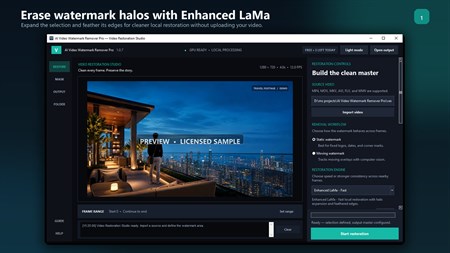
Get pristine, flawless video with a simple one-time purchase. No subscriptions.
Effortlessly remove any watermark from your videos with AI Video Watermark Remover Pro. Powered by cutting-edge LaMa AI inpainting technology, our application intelligently reconstructs the area behind unwanted logos, text overlays, and timestamps.
Unlike online tools that require you to upload sensitive files, our app performs all processing 100% offline on your computer. Your videos never leave your hard drive, ensuring complete security and confidentiality.
Our revolutionary system is designed to handle every type of watermark with ease:
Perfect for fixed logos or text that stay in one place. Simply paint over the watermark on one frame, and the AI will erase it from the entire video.
Tackle dynamic watermarks like those on TikTok or broadcast logos. Draw a box around the watermark on the first frame, and our robust object tracker will follow it and erase it, frame by frame.
Utilizes state-of-the-art AI to produce natural, high-quality results without blurry patches or artifacts.
Robust AI tracking system follows moving watermarks throughout the entire video automatically.
Leverages NVIDIA GPU CUDA for significantly faster processing with full CPU support.
Original audio track automatically preserved and perfectly synced with cleaned video.
All processing happens locally. Your videos never leave your computer.
Supports MP4, AVI, MKV, MOV, WMV, and more. Output as high-quality MP4.
Remove watermarks from stock footage or clean up recordings.
Clean up client-provided footage with unwanted overlays.
Restore old videos with date stamps or broadcast logos.
Repurpose content by removing platform-specific watermarks.
Yes! Our Advanced Mode uses AI object tracking to follow moving watermarks throughout the video and remove them frame by frame.
Yes! All processing happens locally on your PC. Your videos are never uploaded anywhere.
All major formats: MP4, AVI, MKV, MOV, WMV, FLV, WebM. Output is high-quality MP4.
Yes! The original audio track is automatically preserved and synced with the cleaned video.
It depends on video length and your hardware. With a CUDA GPU, expect roughly 1-3 minutes per minute of video.
An NVIDIA GPU with CUDA is recommended but not required. CPU processing works too, just slower.
Yes! You can queue multiple videos for sequential processing.
No! It's a one-time purchase—pay once and own it forever with lifetime updates.
Stop letting distracting logos and text ruin your videos. Download now and see the magic for yourself!
Sort, rename, and clean folders with AI-assisted file organisation.
Create polished captions with local Whisper models and styled exports.
Push images to 2× or 4× with specialised Real-ESRGAN models.
Transcribe meetings, create local summaries, and export what matters.