AI-Powered Smart Sorting
Analyzes file content and context — not just extensions — using OpenAI, Claude, Gemini, or Ollama.
Declutter your digital life — let AI sort, rename, and organize your files automatically.
One-time purchase — no subscriptions, no recurring fees. Install on up to 10 Windows devices.
Digital clutter is one of the most underestimated productivity drains in modern computing. The average Windows user accumulates thousands of files across a handful of overloaded folders — the Downloads directory being the most notorious offender — where documents, installers, images, spreadsheets, and compressed archives pile up with generic, meaningless names that make retrieval a matter of luck rather than logic. AI File Organizer Pro exists to solve this problem permanently, using AI-driven content analysis to understand what your files actually are and sort them accordingly.
The fundamental difference between this tool and conventional file management utilities is that it reads file content, not just metadata. A traditional rule-based organizer can move every PDF into a documents folder, but it cannot distinguish between a rental agreement, a conference paper, and a product receipt. AI File Organizer Pro can, because it passes file content to a configurable AI model — compatible with OpenAI, Anthropic Claude, Google Gemini, or a locally running Ollama instance — and uses the resulting understanding to place each file in the most contextually appropriate location and rename it with a meaningful, descriptive label.
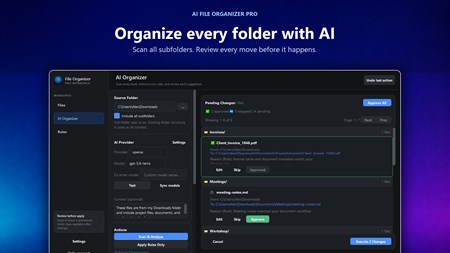
The secure preview system is central to the product's design philosophy. Before a single file moves, the application presents a complete side-by-side breakdown of every planned action: which files will move, where they will go, and what they will be renamed. You approve or reject changes individually or in bulk. Nothing is irreversible — a comprehensive undo system can roll back any action, and the option to move files to the Recycle Bin rather than deleting them permanently provides an additional safety net. For users who deal with software projects, a dedicated project detection engine identifies Python, Node.js, Unity, and other development project structures and keeps them grouped and intact rather than fragmenting them across category folders.
Analyzes file content and context — not just extensions — using OpenAI, Claude, Gemini, or Ollama.
Renames files based on actual content (e.g., 'IMG_2934.jpg' → 'Meeting_Whiteboard_Notes.jpg').
See exactly what will happen before any file is moved — approve or reject changes side-by-side.
Create automation rules based on file size, date, extension, or regex for specific workflows.
Revert any organization action with a single click. Also supports 'Move to Recycle Bin'.
Recognizes coding projects (Python, Node.js, Unity) and keeps their folder structures intact.
Transform a chaotic Downloads folder into a clean, organized library instantly.
Sort thousands of photos by date, event, or subject automatically.
Auto-file invoices, receipts, and contracts by year or client.
Keep coding projects structured and grouped correctly.
The custom rules engine adds a second layer of control for power users and IT professionals who have specific organisational requirements that go beyond what the AI can infer from content alone. Rules can be defined using combinations of file attributes — size ranges, date ranges, specific extensions, regular expression patterns — and applied either in isolation or as pre-processing filters before the AI analysis step. This makes the tool equally valuable for individuals cleaning up personal computers and for professionals managing structured business file repositories that must conform to compliance or archiving standards.
Yes — using Ollama integration you can run AI analysis completely offline with no data sent anywhere.
OpenAI GPT-4, Anthropic Claude, Google Gemini, and local Ollama models.
No — files are moved, not deleted. Every action can be undone, and a 'Move to Recycle Bin' option is always available.
Yes — the Secure Preview shows a side-by-side comparison of all planned changes before you approve them.
Yes — duplicate detection identifies and flags duplicate files so you can clean them up safely.
Platform: Windows 10 version 17763.0 or higher
Memory: 4 GB (min), 8 GB (rec)
App Size: 103 MB
Developed by: Bytesweavers
One-time purchase of $12.99 — yours forever, on up to 10 Windows devices.
Create polished captions with local Whisper models and styled exports.
Push images to 2× or 4× with specialised Real-ESRGAN models.
Transcribe meetings, create local summaries, and export what matters.
Generate private AI art with built-in models and a generous free tier.