Add your script
Paste short text or prepare a longer narration.
Turn scripts, lessons, stories, and accessibility text into natural speech from a practical Windows workspace.
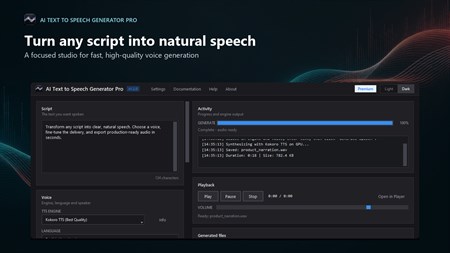
Download the Windows app and generate speech with the included free engines.
AI Text To Speech Generator Pro organizes voice selection, script preparation, playback, and export in one desktop app. Browse available voices, tune speaking speed, divide long text into manageable sections, and listen before saving your audio.
Start with Piper and Google TTS in the free tier. Premium production adds Kokoro and Bark, unlimited scripts, MP3 output, and NVIDIA GPU acceleration.
Paste short text or prepare a longer narration.
Browse voices and select the engine that fits your project.
Adjust speed and preview the generated speech.
Save WAV audio, or use Premium for MP3 and advanced engines.
Use Piper and Google TTS free, with Kokoro and Bark available through Premium.
Split and stitch longer scripts so narration projects remain organized and manageable.
Adjust delivery from slower, clearer speech to faster narration and preview the result.
Listen to generated speech before export without leaving your production workspace.
Export WAV files free, with MP3 output available for Premium production.
Premium users can use supported NVIDIA hardware to speed up demanding generation.
Produce narration for tutorials, explainers, and short videos.
Turn lessons and study notes into accessible audio.
Listen to drafts, stories, and dialogue during review.
Create voice tracks for demonstrations, training, and presentations.
Yes. The free tier includes Piper and Google TTS, up to 2,000 characters per generation, ten daily generations, and WAV export.
Premium adds the Kokoro and Bark engines alongside the included free options.
Yes. The app includes a workflow for dividing and stitching longer text so narration remains easier to manage.
Free users can export WAV. Premium users can also export MP3.
Premium supports compatible NVIDIA GPUs for faster generation, while CPU processing remains available.
Create narration, accessibility audio, lessons, and long-form speech from one Windows app.
Sort, rename, and clean folders with AI-assisted file organisation.
Create polished captions with local Whisper models and styled exports.
Push images to 2× or 4× with specialised Real-ESRGAN models.
Transcribe meetings, create local summaries, and export what matters.