100% Offline Privacy
All processing is local. No data is uploaded to the internet — safe for confidential documents.
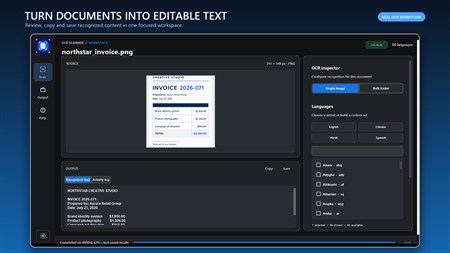
Extract text from images and PDFs instantly — bulk processing, 20+ languages, 100% offline.
One-time purchase — no subscriptions, no recurring fees. Install on up to 10 Windows devices.
There is a category of digital task that sounds simple on the surface but proves remarkably tedious in practice: extracting text from images. Whether you are working with scanned paper documents, screenshots containing important information, photographs of printed materials, or PDFs that were created from scans rather than digital text, the process of manually retyping content is slow, error-prone, and completely unnecessary when the right software is available. AI Offline OCR Scanner Pro automates this process with high accuracy, processing entire folders of image files in bulk while running entirely on your own hardware.
The optical character recognition engine supports more than twenty languages simultaneously, which means a document containing a mix of English, Chinese, and Arabic text can be processed in a single pass without any manual configuration. The layout preservation mode applies intelligent paragraph detection to maintain the natural reading order of structured documents — important for legal contracts, academic papers, and formatted reports where the spatial arrangement of text carries meaning. Output can be saved in plain text for simple use cases, JSON format for developers who need bounding box coordinates and per-word confidence scores, or CSV for users who want to import extracted data directly into spreadsheets.
Privacy is a structural feature of this application, not an afterthought. Many organisations handle documents that contain sensitive personal information, financial data, or confidential business content that cannot be sent to a cloud OCR API without creating compliance and data protection risks. Because AI Offline OCR Scanner Pro runs its entire processing pipeline locally, those concerns disappear. Your documents are read by the application on your machine and nowhere else. For healthcare administrators, legal professionals, accountants, and anyone else regularly handling sensitive paper-based information, this is the practical, compliant choice for text extraction at scale.
All processing is local. No data is uploaded to the internet — safe for confidential documents.
Point the app at a folder and it extracts text from every image automatically.
Full NVIDIA CUDA support for lightning-fast extraction. Automatically falls back to CPU.
Supports English, Chinese, Japanese, Korean, Arabic, French, German, and more simultaneously.
Save results as TXT, JSON (with bounding boxes), or CSV (spreadsheet-ready).
Smart paragraph detection maintains the natural reading order of structured documents.
Convert scanned paper archives into searchable, editable text.
Extract structured data from receipts, invoices, and forms automatically.
Instantly grab text from screenshots, diagrams, or presentation slides.
Process documents containing multiple languages in a single scan.
The GPU acceleration support is more impactful than it might initially appear. When processing a folder containing hundreds of scanned document pages, the difference between CPU-only processing and NVIDIA CUDA-accelerated processing can mean the difference between a workflow that takes hours and one that completes in minutes. The application detects compatible hardware automatically and allocates processing accordingly, so users with modern graphics cards get maximum throughput without any additional configuration, while users on standard laptops or older hardware simply wait a little longer for the same accurate results.
No — all OCR processing runs locally on your PC. No internet connection is ever needed.
JPG, PNG, BMP, TIFF, WEBP, and PDF files.
20+ languages including English, Chinese (Simplified & Traditional), Japanese, Korean, Arabic, French, German, Spanish, and more.
No — GPU is optional but recommended. The app automatically falls back to CPU processing if no compatible GPU is found.
TXT (plain text), JSON (with bounding boxes and confidence scores), and CSV (spreadsheet-ready).
Platform: Windows 10 version 17763.0 or higher
Memory: 4 GB (min), 8 GB (rec)
App Size: 4.5 GB
Developed by: Bytesweavers
One-time purchase of $9.99 — yours forever, on up to 10 Windows devices.
Sort, rename, and clean folders with AI-assisted file organisation.
Create polished captions with local Whisper models and styled exports.
Push images to 2× or 4× with specialised Real-ESRGAN models.
Transcribe meetings, create local summaries, and export what matters.