100% Offline & Private
Your prompts and audio never leave your computer. No subscriptions, no cloud servers.
Generate royalty-free music from text prompts — 100% offline on your PC.
Free download · Premium upgrade available — no subscriptions, no recurring fees. Install on up to 10 Windows devices.
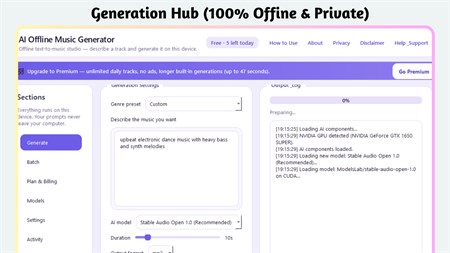
Imagine having a professional recording studio sitting quietly inside your Windows PC, available at any hour, never charging a subscription fee, and never uploading a single byte of your creative work to the internet. That is exactly what AI Offline Music Generator delivers. It is a desktop application built for people who need original audio — whether for a YouTube video, a short film, a game prototype, or simply personal creative exploration — without the headache of licensing, royalty claims, or recurring cloud costs.
The engine behind the app is Stable Audio Open, a state-of-the-art generative audio model that interprets natural language and converts it into structured sound. You do not need musical training or audio production knowledge. Simply type a description such as "mellow jazz piano with a walking bassline" or "tense orchestral strings building to a crescendo," and the model interprets the emotional and sonic intent of your words to produce a polished result. The output quality rivals commercially licensed tracks, yet every clip is yours to keep and use without restriction.
Beyond single-track generation, the application supports a workflow that professionals will immediately appreciate. You can queue up an entire list of creative briefs in a plain text file and walk away while the system processes them one by one — producing a library of unique audio assets in the background. Whether your NVIDIA GPU handles the workload at full speed or the system falls back to your CPU for slower but equally valid results, the software adapts automatically to your hardware without requiring any manual configuration.
Your prompts and audio never leave your computer. No subscriptions, no cloud servers.
Describe any genre, mood, or instrument set and the AI generates a unique track instantly.
Load a text file of ideas and generate dozens of unique tracks automatically.
Export tracks directly to WAV or MP3. Generate up to 30-second tracks.
Hand-crafted presets for instant inspiration when you're not sure what to type.
Utilizes NVIDIA GPUs for lightning-fast generation; falls back to CPU automatically.
Generate background music for YouTube, podcasts, and social videos.
Create custom in-game audio without licensing fees.
Produce cinematic scores and soundscapes for your projects.
Experiment with AI-generated music for personal enjoyment.
What genuinely sets this tool apart from every web-based alternative is the unconditional privacy model. There is no account to create, no API key to manage, and no data leaving your machine. The moment you finish generating a track, the WAV or MP3 file is written locally and the process is complete. There is no telemetry, no usage analytics, and no mechanism by which your creative ideas could reach an external server. For professionals working on confidential projects — game studios under NDA, filmmakers with unreleased content, or corporate teams building internal media — this level of isolation is not a bonus feature; it is a fundamental requirement that most cloud-based tools simply cannot offer.
Yes — after installation, no internet is required. All generation happens locally on your PC.
It uses Stable Audio Open and other compatible open-source models that run entirely on your hardware.
Windows 10 (17763+). Minimum 4 GB RAM. An NVIDIA GPU (RTX 2060+) with 16 GB RAM is recommended for fast generation.
WAV and MP3. You can generate tracks up to 30 seconds long.
Yes — you can add and manage compatible Hugging Face models directly from the app.
Platform: Windows 10 version 17763.0 or higher
Memory: 4 GB (min), 8 GB (rec)
App Size: 5.4 GB
Developed by: Bytesweavers
Free download · Premium upgrade available of FREE — yours forever, on up to 10 Windows devices.
Sort, rename, and clean folders with AI-assisted file organisation.
Create polished captions with local Whisper models and styled exports.
Push images to 2× or 4× with specialised Real-ESRGAN models.
Transcribe meetings, create local summaries, and export what matters.