
AI OCR Scanner Pro
Extract text from images instantly — 100% private, on-device OCR powered by Apple Vision. Completely free.
Mac App • Apple Vision Framework • 11+ Languages • Batch Processing • No Internet Required
Download Free on the Mac App Store
Completely free. No in-app purchases, no subscriptions, no accounts. Just fast, private OCR on your Mac.
Download AI OCR Scanner Pro — FreeCompletely Free No Internet Required Data Never Leaves Your Mac
Fast, Secure, Fully Offline OCR for Mac
AI OCR Scanner Pro is a fast, secure, and fully offline text recognition tool built exclusively for macOS. Powered by Apple’s native Vision framework, it extracts text from screenshots, scanned documents, receipts, handwritten notes, and photos without ever sending your sensitive data to the cloud.
Whether you need to instantly grab text from a single image or batch-process an entire directory of documents, AI OCR Scanner Pro delivers high-accuracy results in seconds — entirely on your Mac. And it’s completely free, with no in-app purchases and no subscriptions.
Key Features
100% Private & On-Device
All OCR processing happens locally using Apple’s Vision framework. No internet connection is ever required, and your documents, screenshots, and scans never leave your Mac.
Single Image Scan
Drag and drop or open any image for instant text extraction. Results appear in seconds and can be copied to your clipboard in one click — perfect for quick, on-the-fly OCR.
Batch Folder Processing
Point the app at an entire folder of scanned documents, receipts, or screenshots and let it process every image automatically, saving extracted text files alongside each source.
11+ Language Auto-Detection
Automatically detects and correctly extracts text in over 11 languages including English, Chinese, French, German, Japanese, Korean, Spanish, and more — with no manual selection required.
Fast & Accurate Modes
Switch between Fast mode for rapid results on clean documents, and Accurate mode for maximum precision on complex, degraded, or handwritten content.
Language Correction Toggle
Enable language correction to let the Vision framework intelligently clean up recognition errors, or disable it for raw literal output when working with codes or structured data.
Flexible Export Formats
Export extracted text as plain .txt files for documents, structured JSON for developer workflows, or CSV for spreadsheet and data integration pipelines.
Powered by Apple Vision
Built on Apple’s native Vision framework — the same OCR engine powering macOS — for reliable, high-accuracy results that improve with every macOS update, no third-party models needed.
Supported Languages
Automatically detects and accurately extracts text in 11+ languages — no manual language selection required.
Export Formats
One extraction, multiple output options — pick the format that fits your workflow.
.TXT
Plain text for documents, notes, and archives.
JSON
Structured output for developer integrations.
CSV
Spreadsheet-ready for data analysis workflows.
Screenshots
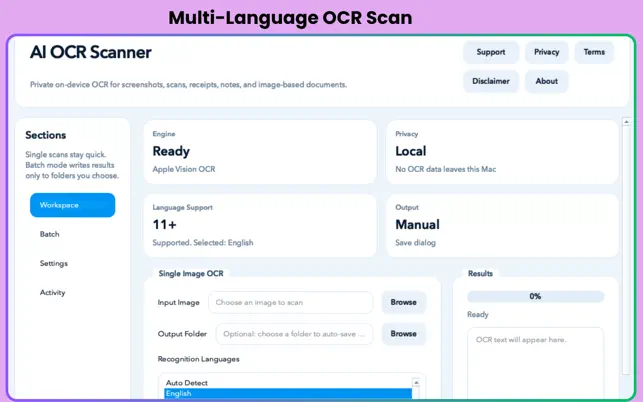
Multi-Language OCR
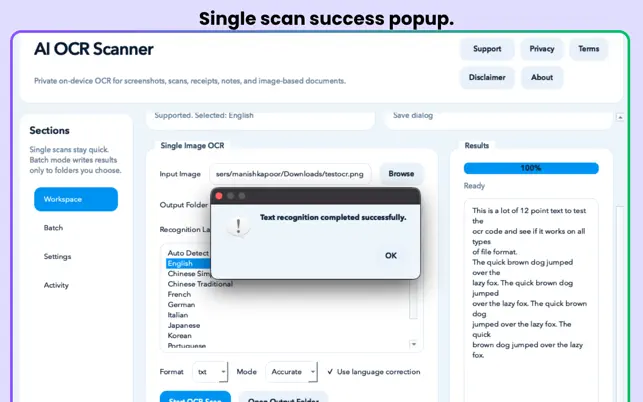
Single Scan Result
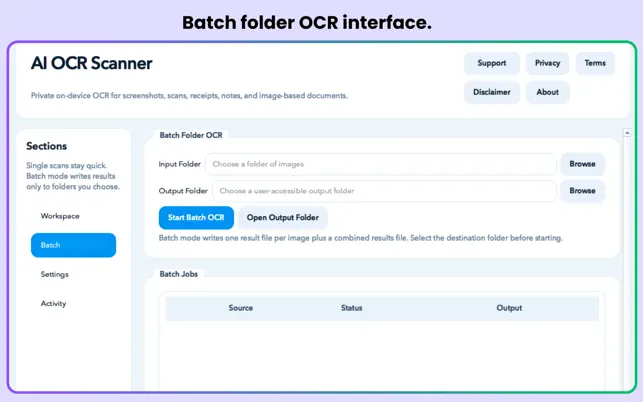
Batch OCR Processing
Who is it For?
- Office & Admin Workers: Extract text from scanned contracts, invoices, and receipts without manual retyping.
- Researchers & Students: Pull text from screenshots, PDFs exported as images, and photographed book pages.
- Developers: Batch-process image datasets and export structured JSON or CSV for downstream pipelines.
- Multilingual Users: Extract text from documents in Japanese, Chinese, Arabic, and other non-Latin scripts.
- Privacy-Conscious Users: Handle sensitive documents with zero cloud exposure and complete on-device processing.
App Details & Requirements
- Platform: Mac only
- macOS: macOS 12.0 (Monterey) or later
- Chip: Apple M1 or later (required)
- Size: 27.1 MB
- Price: Completely Free — no in-app purchases
- Age Rating: 4+
- Developer: Manish Kapoor / Bytesweavers
- Category: Productivity
Frequently Asked Questions
Is this app truly free with no hidden costs?
Yes, completely. AI OCR Scanner Pro is 100% free with no in-app purchases, no subscriptions, and no premium tiers. Every feature listed is available to every user at no cost.
Are my documents uploaded to a server?
Never. The developer has confirmed that no data is collected from this app. All OCR processing is handled entirely by Apple’s on-device Vision framework. Your images never leave your Mac at any point.
What image formats does it accept?
The app accepts all standard macOS-supported image formats including PNG, JPG/JPEG, HEIC, TIFF, BMP, and WebP. If macOS can display it, the app can scan it.
What is the difference between Fast and Accurate modes?
Fast mode prioritizes speed and is ideal for clean, clearly printed text in receipts, screenshots, or typed documents. Accurate mode takes slightly longer but achieves higher precision on degraded scans, handwritten content, or images with complex layouts.
Does this work on Intel Macs?
No. The app requires Apple Silicon (M1 or later) and macOS 12.0 or later. It is not compatible with Intel-based Macs.
How does batch processing work?
Switch to Batch mode, select an input folder containing your images, choose an output location, and click run. The app processes every supported image file in the folder automatically and saves the extracted text in your chosen format (.txt, JSON, or CSV) alongside or separate from the originals.
Extract Text from Any Image — Completely Free
Private, offline, and instant. No cloud, no cost, no compromise.
Download AI OCR Scanner Pro — Free on Mac App Store