
AI Image Background Remover
Instantly remove backgrounds from any image with the power of AI.
Windows Desktop App • 100% Offline & Private • Free & Pro Versions
Get Started Now
Start for free or unlock professional-grade features with the Pro version at the current special price.
Get Pro Version –Your Private Background Removal Solution
Designed for e-commerce sellers, graphic designers, and photographers, our powerful desktop tool gives you complete control over your creative workflow. Unlike online tools, AI Image Background Remover runs 100% offline on your computer. This guarantees your images remain completely private and secure—there are no uploads, no data collection, and no privacy concerns.
Whether you need to create product photos with transparent backgrounds, design marketing materials, or process hundreds of images for your online store, this app delivers professional results without compromising your privacy.
Powerful Features
Advanced AI Engine
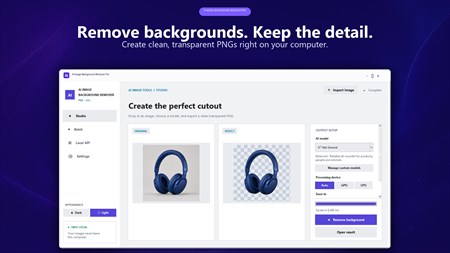
Intelligently detect foreground subjects and erase backgrounds cleanly, handling complex details like hair, fur, and semi-transparent objects with ease.
17+ Specialized Models PRO
Choose from a variety of models fine-tuned for portraits, products, animals, and high-resolution photography for perfect results every time.
Powerful Bulk Processing PRO
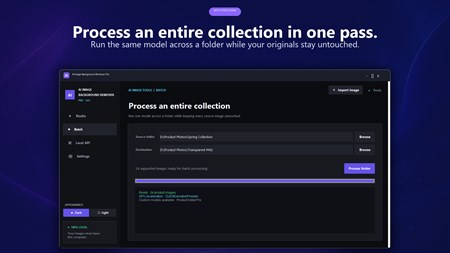
Save hours of manual work by processing entire folders of images at once. Set your options and let the app do the work.
Bring Your Own Models PRO
Power users can import their own custom .onnx models via the intuitive Model Manager for unlimited flexibility.
Free vs. Pro
| Feature | Free | Pro ( |
|---|---|---|
| 100% Offline Processing & Privacy | ||
| High-Quality AI Cutouts | ||
| Number of AI Models | Multiple | 17+ Specialized |
| Bulk Folder Processing | ||
| Custom Model Support | ||
| Daily Usage Limit | Yes | Unlimited |
| Price | Free |
Screenshots
Frequently Asked Questions
Does it work completely offline?
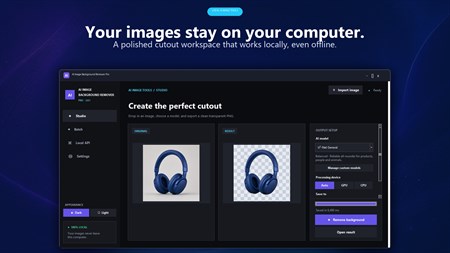
Yes! AI Image Background Remover works 100% offline. All processing happens locally on your computer using bundled AI models. Your images are never uploaded to any server, ensuring complete privacy and security.
What image formats are supported?
The app supports all common image formats including PNG, JPG, JPEG, BMP, TIFF, and WebP. Output is saved as PNG to preserve transparency, or JPG if you prefer a solid background color.
How well does it handle complex edges like hair?
The Pro version includes specialized AI models optimized for different subjects including portraits with complex hair, fur on animals, and semi-transparent objects. These models produce cleaner edges than general-purpose tools.
Can I process multiple images at once?
Yes! The Pro version includes powerful bulk processing. Simply select a folder and the app will remove backgrounds from all images automatically. This is perfect for e-commerce sellers processing product catalogs.
What’s the difference between the 17+ models?
Each model is optimized for different use cases: portrait models for photos of people, product models for e-commerce items, animal models for pets and wildlife, and general models for mixed content. Choose the right model for the best results.
Is GPU acceleration supported?
Yes! The app supports both CPU and GPU processing. If you have an NVIDIA GPU with CUDA support, background removal will be significantly faster. The app automatically detects your hardware and optimizes accordingly.
Can I import my own AI models?
Yes! The Pro version includes a Model Manager that lets you import your own custom .onnx models. This is great for specialized use cases or if you’ve trained your own background removal model.
What are the system requirements?
Requires Windows 10 version 1903 or higher, or Windows 11. Minimum 4GB RAM (8GB recommended). An NVIDIA GPU is optional but recommended for faster processing. About 4GB of disk space for the app and models.
Remove Backgrounds in Seconds
Download the free version to see the power of offline AI, or grab the Pro version for unlimited power! Current special pricing available for a limited time.
Get Pro –