
AI Image Background Remover
Remove backgrounds instantly and securely on your Mac — fully local, zero cloud uploads.
Mac App • Apple Silicon Optimized • U-2-Net / BiRefNet / IS-Net • Batch Processing
Download on the Mac App Store
Start removing backgrounds for free — no account, no cloud, no waiting. Upgrade to Pro for bulk batch processing.
Download Free — Single Image Cutouts Go Pro — $5.99/mo or $19.99/yrNo Cloud Uploads Works 100% Offline Apple Silicon Accelerated
Instant, Private Background Removal on Your Mac
AI Image Background Remover is a powerful, privacy-first macOS tool designed to cleanly separate subjects from their backgrounds. Because all processing happens locally on your Mac using Apple’s Neural Engine and GPU, your photos are never uploaded to the cloud — ensuring total privacy, zero queue wait times, and full offline capability.
Whether you need crisp transparent PNGs for e-commerce product shots, clean portrait cutouts for composites, or batch-processed folders of hundreds of images, this tool delivers professional-quality results from the first drag-and-drop — entirely on your own hardware.
Free & Pro Plans
Remove backgrounds for free on individual images. Upgrade to Pro for bulk folder processing and custom ONNX model support.
Free
No credit card. Drag, drop, and cut out immediately.
- Single image background removal
- Drag & drop simplicity
- U-2-Net — general purpose model
- BiRefNet — high detail & portraits
- IS-Net — anime & complex edges
- Apple Neural Engine & GPU acceleration
- Transparent PNG export
- 100% offline after model download
Pro
or $19.99/year (save 72%)
Auto-renewing. Manage anytime via App Store.
- Everything in the Free plan
- Batch folder processing — hundreds of images automatically
- Custom ONNX models — import your own specialized models
- Perfect for product photography at scale
- Bulk portrait session workflows
- Priority feature updates
Industry-Leading Built-In AI Models
Three state-of-the-art models included free — each optimized for a different type of subject and edge complexity.
U-2-Net
The gold standard for general-purpose background removal. Handles a wide variety of subjects — people, objects, products — with clean, reliable cutouts every time.
BiRefNet
Exceptional at high-detail subjects including hair, fine edges, and portrait photography. The ideal choice for professional headshots and product images requiring sharp precision.
IS-Net
Specifically tuned for illustrated characters, anime artwork, and images with intricate or non-photographic edges that trip up standard models.
Key Features
Drag & Drop Simplicity
Drop any photo onto the app and get a transparent PNG back in seconds. No complex workflows, no settings to learn — just instant, clean cutouts from the very first use.
100% Private & Offline
Once AI models are downloaded, the app runs entirely without internet. Your photos are never uploaded, analyzed, or stored anywhere remotely — total data privacy guaranteed.
Apple Silicon Accelerated
Automatically leverages your Mac’s Neural Engine and GPU via Metal for lightning-fast background removal. Optimized natively for M1, M2, and M3 chips.
Transparent PNG Export
Every cutout exports as a clean transparent PNG ready to drop into design tools, e-commerce platforms, presentations, or any compositing workflow.
Batch Folder Processing Pro
Select an entire folder of images and let the app automatically process hundreds of product shots or portraits in one unattended batch — saving hours of manual work.
Custom ONNX Models Pro
Import your own ONNX models tailored to specialized use cases — niche subject types, industry-specific imagery, or proprietary fine-tuned segmentation models.
Screenshots
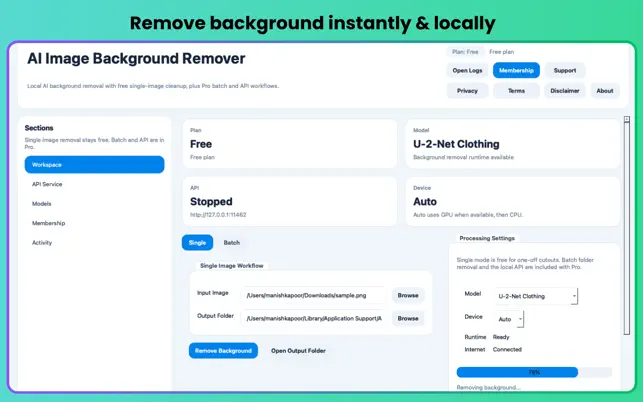
Remove Image Background Easily
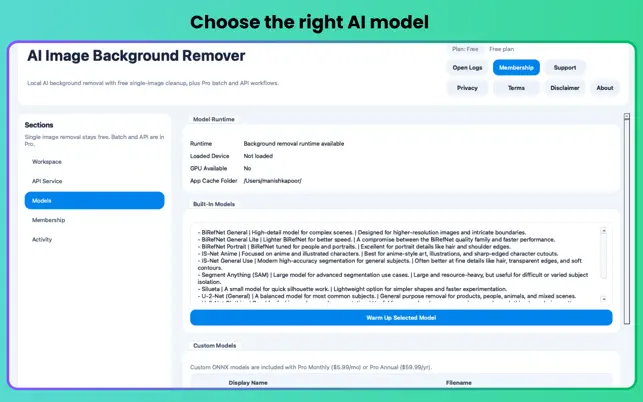
Choose the Right AI Model
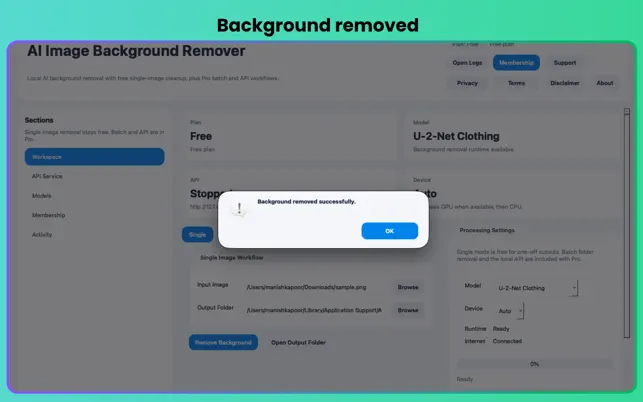
Clean Background Removed Result
Who is it For?
- E-Commerce Sellers: Batch-produce crisp product shots on white or transparent backgrounds at scale.
- Graphic Designers: Create composites and cut out subjects in seconds without leaving your local machine.
- Photographers: Process bulk portrait sessions automatically with consistent, professional results.
- Developers: Load custom ONNX models and integrate local background removal into your own automation pipelines.
- Privacy-Conscious Professionals: Handle client or sensitive images with zero cloud exposure at any stage.
System Requirements
- Platform: Mac only
- macOS: macOS 12.0 (Monterey) or later
- Chip: Apple M1 or later (required)
- Size: 45.6 MB
- Age Rating: 4+
- Developer: Manish Kapoor / Bytesweavers
- Category: Graphics & Design
Frequently Asked Questions
Are my images uploaded to a cloud server?
Never. The developer has confirmed that no data is collected from this app. After the initial AI model download, the app runs entirely offline. Your images never leave your Mac at any point in the process.
Which AI model should I use?
Use U-2-Net for most everyday subjects — products, objects, and general photos. Switch to BiRefNet for portraits, hair, and images requiring high-detail edge precision. Choose IS-Net for illustrated characters, anime artwork, or images with non-photographic complex edges.
Does this work on Intel Macs?
No. The app requires Apple Silicon (M1 or later) to leverage the Neural Engine and Metal GPU acceleration. It is not compatible with Intel-based Macs.
How does batch processing work?
With a Pro subscription, select an entire folder of images and the app will automatically remove the background from every file — outputting clean transparent PNGs for each one without any manual intervention per image.
Can I cancel my Pro subscription?
Yes. Subscriptions are managed via your Apple Account in the App Store and can be cancelled at any time. You retain Pro access until the end of your current billing period, then revert to the free single-image plan.
Remove Backgrounds Instantly on Your Mac
Free single-image cutouts. No cloud. No waiting. Professional results in seconds.
Download Free on Mac App Store Go Pro — $5.99/mo or $19.99/yr