Advanced DICOM Viewer
Window/Level adjustments (Bone, Lung, Brain presets), pan, zoom, and MPR for 3D volume slicing.
View DICOM medical imaging files and analyze them with Vision AI — for education and research only.
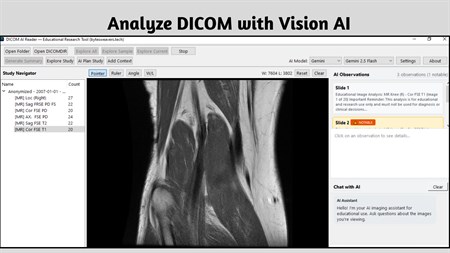
One-time purchase — no subscriptions, no recurring fees. Install on up to 10 Windows devices.
⚠️ Important Disclaimer: AI DICOM Reader is strictly an educational, technical, and research utility. It is not a medical device, has not been cleared by any regulatory authority for clinical use, and must never be used to guide diagnosis, treatment decisions, or patient care of any kind. Always consult a qualified and licensed healthcare professional for any medical concern.
With that clearly stated, AI DICOM Reader addresses a genuine gap that exists for a specific and growing audience: students studying radiology or medical imaging, AI researchers exploring the frontier of vision language models on clinical data formats, and software engineers who work with healthcare data pipelines and need a practical desktop tool for inspecting DICOM files without spinning up expensive PACS infrastructure. For all three groups, this application provides a capable, privacy-respecting environment for learning and technical experimentation.
The DICOM standard is notoriously complex. Files contain not just pixel data but dense headers encoding acquisition parameters, patient metadata, series hierarchies, and technical values like Hounsfield Units and TR/TE measurements that require specialist knowledge to interpret. AI DICOM Reader parses all of this locally, renders it visually with adjustable windowing presets tuned for different tissue types, and optionally passes a converted image representation to whichever AI vision model you configure — whether that is a cloud API from OpenAI, Anthropic, or Google, or a fully local Ollama model that keeps every image and every AI response exclusively on your hardware.
The resulting educational summaries are compiled from the AI's observations alongside your manual annotations and extracted metadata, and can be exported to PDF, DOCX, HTML, or plain text. These are research artifacts, not clinical documents, but they represent a genuinely useful output for anyone trying to understand how modern AI systems interpret medical imaging data.
Window/Level adjustments (Bone, Lung, Brain presets), pan, zoom, and MPR for 3D volume slicing.
Connect OpenAI (GPT-4o), Claude, Gemini, OpenRouter, or Ollama for local offline AI analysis.
Draw ROI regions, measure distances, angles, and calculate pixel densities (HU/SI).
No telemetry, no cloud sync. You control exactly what data goes to AI APIs.
Export AI-generated educational summaries to PDF, DOCX, HTML, or TXT.
Extract and parse hidden DICOM metadata and acquisition tags automatically.
Learn to interpret imaging data by testing how AI models read DICOM scans.
Benchmark vision models against medical imaging formats.
Explore DICOM format parsing and AI integration in a desktop app.
Use as a teaching tool to demonstrate medical imaging concepts.
The measurement toolkit — covering region-of-interest drawing, distance measurement, angle calculation, and Hounsfield Unit density analysis — provides the hands-on tools that imaging students and researchers need to engage meaningfully with the data rather than simply viewing it passively. Combined with Multi-Planar Reconstruction for navigating volumetric CT and MRI data in three dimensions, AI DICOM Reader offers a depth of technical capability that is unusual for a desktop application at this price point.
No — this is strictly an educational and research tool. It is NOT cleared for medical diagnosis or patient care.
OpenAI GPT-4o, Anthropic Claude, Google Gemini, OpenRouter, and local Ollama models for 100% offline analysis.
Yes — DICOM file processing is fully offline. AI analysis requires your configured API keys (Ollama for fully offline use).
Educational research summaries can be exported to PDF, DOCX, HTML, or TXT formats.
Window/Level presets, MPR 3D reconstruction, ROI measurement, distance/angle tools, and full metadata parsing.
Platform: Windows 10 version 17763.0 or higher
Memory: 4 GB (min), 6 GB (rec)
App Size: 1.3 GB
Developed by: Bytesweavers
One-time purchase of $11.99 — yours forever, on up to 10 Windows devices.
Sort, rename, and clean folders with AI-assisted file organisation.
Create polished captions with local Whisper models and styled exports.
Push images to 2× or 4× with specialised Real-ESRGAN models.
Transcribe meetings, create local summaries, and export what matters.