
AI Auto Browser
Automate any web task with AI — navigate, click, download, and schedule on autopilot.
Windows Desktop App • OpenAI • Claude • Gemini • Ollama Support
Download AI Auto Browser
Completely free — no purchase, no subscriptions, no recurring fees. Install on up to 10 Windows devices.
Get it Free on Microsoft StoreAbout AI Auto Browser
Think about how much of your working day involves opening the same
websites, logging in, clicking through the same sequence of menus, downloading the same reports, and
repeating the same data-entry steps that a reasonably attentive person could do in their sleep. AI Auto
Browser was designed to reclaim that time. It is a Windows desktop application that connects a real,
controllable web browser to the reasoning power of large language models, giving you an agent that reads web
pages the way a human does — understanding layout, context, and intent — and then acts on them with reliable
precision.
The application supports a bring-your-own-key model, meaning you connect whichever AI provider you already
trust: OpenAI, Anthropic, Google Gemini, Groq, DeepSeek, or a locally running Ollama instance for those who
want zero external API calls. Once connected, you describe a task in plain English — “log into my analytics
dashboard, download last week’s CSV report, and save it to my Desktop” — and the agent works through every
step independently. It handles cookie consent banners, navigates pagination, deals with dynamic
JavaScript-heavy pages, and recovers from unexpected page states without needing hand-holding.
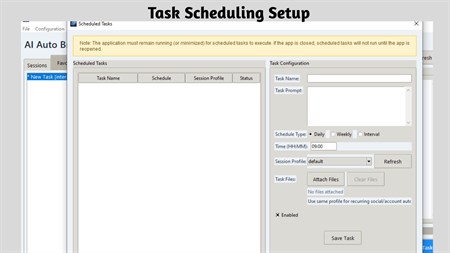
Persistent browser sessions mean that once you have authenticated with a site, the agent can return to it on
a schedule — daily, weekly, or at a custom interval you define — without prompting you for login credentials
each time. Your session data, API keys, and task history never leave your machine; they are stored and
protected within your local Windows environment. This combination of automation power and local-first
privacy makes AI Auto Browser a uniquely capable tool for professionals who need reliable web automation
without the security trade-offs of cloud-based RPA platforms.
Key Features
Intelligent Navigation
The AI reads pages, finds the right buttons, inputs text, bypasses popups, and handles multi-step forms.
Bring Your Own Key (BYOK)
Connect OpenAI, Anthropic, Gemini, Groq, DeepSeek, or run fully offline with Ollama.
Scheduled Automation
Set tasks to run daily, weekly, or at custom intervals in the background.
Persistent Sessions
Log in once — the browser remembers your session so the AI can act on authenticated sites.
Smart File Handling
Automatically captures downloads and can upload them in subsequent workflow steps.
Session Recording
Record automated sessions as video for easy auditing and debugging.
Who Is It For?
Data Monitoring
Monitor competitor prices or track metrics on any website automatically.
Report Downloads
Schedule daily report downloads from dashboards and portals.
Social Automation
Schedule social media uploads and interactions.
Form Filling
Automate repetitive web forms, registrations, and data entry.
Why Choose AI Auto Browser?
For teams and power users, the video recording feature provides a verifiable audit trail of every automated session. You can review exactly which elements the agent interacted with, which buttons were clicked, and how each page responded — invaluable for debugging workflows or demonstrating compliance. The visual element highlighting, which outlines every object the AI is about to interact with in real time, adds an additional layer of transparency that traditional automation scripts completely lack.
Screenshots
Screenshot 1
Frequently Asked Questions
Which AI models are supported?
OpenAI (GPT-4), Anthropic (Claude), Google (Gemini), Groq, DeepSeek, and local Ollama models for fully offline use.
Can it handle login-required sites?
Yes — persistent browser profiles keep you logged in so the AI can perform tasks on authenticated sites.
Does it run in the background?
Yes — with optional headless browser mode, tasks run silently in the background.
Is my data private?
All API keys, chat history, and session data are stored securely on your local Windows machine only.
Can it download files automatically?
Yes — it auto-detects downloads and can use them as inputs for subsequent steps in a workflow.
System Requirements
Platform: Windows 10 version 17763.0 or higher
Memory: 4 GB (min), 8 GB (rec)
App Size: 271.7 MB
Developed by: Bytesweavers
Get AI Auto Browser Today
Completely free — yours forever, on up to 10 Windows devices.
Download on Microsoft Store