
AI Audio Silence Remover Pro
Automatically remove silence, breaths, and pauses from your voice tracks offline.
Windows Desktop App • Silero VAD Neural Networks • 100% Offline & Private
Download from the Microsoft Store
Eliminate long pauses and breathe life back into your pacing instantly.
Buy AI Audio Silence Remover Pro – 5.99100% Safe Checkout Lifetime Updates No Subscriptions
Instant Audio Pacing Automation
Stop wasting hours manually cutting dead air, heavy breaths, and awkward pauses from your voiceovers. AI Audio Silence Remover Pro is a powerful, offline-first desktop utility designed to automate the most tedious parts of audio and video production.
Whether you are a podcaster, YouTuber, audiobook narrator, or content creator, this tool will instantly tighten your pacing and deliver professional, ready-to-use audio tracks. Operating 100% locally on your computer, your private recordings, client voiceovers, and business data never leave your PC, ensuring total confidentiality and maximum render speed.
Dual Trimming Engines
Choose the perfect algorithm to fit your content. Toggle between cutting-edge voice intelligence and strict mathematical accuracy.
Human Speech Only (AI Mode)
Powered by advanced neural networks (Silero VAD), this mode specifically hunts for human vocal frequencies. It retains your speech and natural flow while completely eliminating non-vocal background noise, room tone, deep breathes, and absolute silence. Perfect for podcasts, lectures, and professional audiobooks.
Super Strict (Math Mode)
Perfect for creating fast-paced, modern “jump-cuts” for TikTok, Reels, and YouTube Shorts. This mode uses a customizable mathematical decibel gate to strictly slice out everything below your set volume threshold, giving you that ultra-tight, energetic pacing popular in social media videos.
Professional Grade Features
Advanced AI Voice Detection
Uses Silero VAD neural network technology to accurately analyze human speech, ensuring words aren’t cut off and background hum is dropped.
Super Strict Decibel Gating
Strict mathematical dB gating allows creators to slice pauses to the absolute millisecond, making it ideal for energetic social clips.
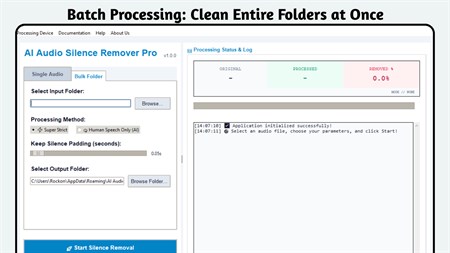
Bulk Folder Processing
Queue up and clean hundreds of audio files automatically in one click while you step away from your desk. Saves hours of manual work.
100% Offline & Private
All processing is handled completely locally on your system. Your files are never uploaded to any server, keeping your data secure.
Real-time Stats Dashboard
See exactly how much time you’ve saved with real-time feedback showing original length, processed length, and saved dead air.
Adjustable Silence Padding
Total breathing room control. Adjust the padding (in seconds) left before and after audio clips to maintain a natural conversation flow.
Hardware-Accelerated
Automatically detects your computer’s GPU for blazing-fast rendering and processing, with an optimized multi-core CPU fallback.
Universal Audio Support
Seamlessly process all major audio formats including MP3, WAV, M4A, FLAC, OGG, AAC, and WMA without compression loss.
Simple 4-Step Workflow
- Import Audio: Load a single file or a whole bulk folder.
- Select Your Engine: Choose Speech-Only (AI) or Strict (Math).
- Set Breathing Room: Adjust the padding slider (e.g. 0.2 seconds) to keep a natural pace.
- Render & Export: Click run to process locally and export perfectly trimmed results.
Who is it Perfect For?
- Podcasters: Remove quiet gaps and hums between speakers without ruining the conversational flow.
- YouTubers & Video Editors: Instantly prep speech tracks for tight “jump-cut” video pacing.
- Audiobook Narrators: Clean up breaths, sighs, and long pauses automatically to satisfy ACX requirements.
- Course Creators: Keep students engaged with snappy, quick-paced lectures free of “umms” and dead air.
System Requirements
Minimum:
- OS: Windows 10 version 17763.0 or higher
- Memory: 4 GB RAM
- Input: Keyboard and Integrated Touch support
- Storage: 500 MB available space
Recommended:
- OS: Windows 11
- Memory: 6 GB RAM or more
- Graphics: Dedicated GPU with Hardware Acceleration enabled
- Storage: SSD for high-speed bulk folder exports
Screenshots
Clean Audio Instantly with AI
Frequently Asked Questions
Does this require an internet connection?
No! AI Audio Silence Remover Pro operates 100% offline. All VAD neural network models and decibel-gating operations run locally on your hardware. Your voice files are never sent to the cloud, ensuring total privacy.
What is the difference between AI Mode and Math Mode?
AI Mode utilizes a lightweight Silero Voice Activity Detector (VAD) to distinguish actual human voice from breaths, clicks, and background hum. Math Mode uses a strict decibel gate, which splits audio as soon as the signal drops below a chosen decibel threshold, making it perfect for rapid jump-cuts.
How does the bulk folder mode work?
Simply toggle to the “Bulk Folder” tab, select your input directory, choose your processing parameters, and click run. The application will scan and process all supported audio files recursively in the folder, placing the output files in a designated clean directory.
What audio formats are supported?
We support all major audio container formats: MP3, WAV, M4A, FLAC, OGG, AAC, and WMA. We preserve the original bitrates and sample rates of your files so there is no degradation in audio quality.
Can I adjust the pacing of my speech?
Yes! The Adjustable Silence Padding lets you set the exact amount of “padding” (breathing room) left around active speech segments. Setting it to 0.1s – 0.3s keeps dialogue incredibly natural, while 0s provides instant jump-cuts.
Is this a one-time purchase or subscription?
This is a 100% one-time purchase! Once you buy the app from the Microsoft Store, you own it forever, including all future updates. No hidden subscriptions, monthly credits, or server access fees.
Fast-Track Your Audio Production Today
Reclaim hours spent cutting pauses. Grab the offline silence remover and instantly tighten your voiceovers!
Buy AI Audio Silence Remover Pro – $5.99