
AI Image Editing Tool Pro
Prompt-driven photo editing and precise inpainting — powered entirely by your local PC.
Windows Desktop App • FLUX / SDXL / InstructPix2Pix • 100% Offline • No Cloud Queues
Download from the Microsoft Store
Start editing for free — upgrade to Pro for unlimited generations, bulk queue, and advanced models.
Download Free — 10 Edits/Day Upgrade to Pro — Premium upgrade via Microsoft StoreNo Cloud Processing Complete Privacy No Hidden Fees
The Next Generation of Local AI Photo Editing
Experience the next generation of creative freedom with AI Image Editing Tool Pro — the ultimate local, privacy-first desktop workflow for prompt-driven photo editing and precise image manipulation. Powered entirely by your local computer’s hardware, this application brings advanced neural network pipelines directly to your desktop. No cloud processing queues, no monthly subscription forced on you, and absolute privacy for your files.
Describe the transformation you want in plain English — swap a plain shirt for a leather jacket, turn a daytime street into a rainy neon cyberpunk scene — or paint a mask over any region and let a specialized inpainting model reconstruct it perfectly. All of this runs on your GPU or CPU, locally, with zero data sent anywhere.
Free & Pro Plans
Start creating for free with 10 edits per day. Upgrade to Pro for unlimited generations, bulk processing, and advanced model access.
Free
No credit card needed. Download and start immediately.
- 10 AI image edits per day
- Prompt-driven photo manipulation
- Built-in mask editor for inpainting
- 100% offline & private processing
- Core AI models included
- PNG export with metadata
- NVIDIA GPU & CPU support
Pro
or Premium upgrade via Microsoft Store
In-app purchase via Microsoft Store.
- Everything in Free
- Unlimited image generations
- Bulk queue processing — batch multiple files
- Access to advanced & latest AI models
- Custom model import support
- High-resolution output up to 4096px
- Saved workflow presets
- JSON sidecar metadata export
- Priority feature updates
Powered by Next-Gen AI Models
Access specialized open-source neural networks optimized for local desktop environments — pick the right model for every editing job.
FLUX.2 Klein 4B
Lightning-fast instruction-based edits. Incredible responsiveness for iterating on prompt-driven transformations in real time.
SDXL Inpaint
High-resolution, precise region replacements. The go-to model for clean masked inpainting with professional-grade outputs.
SDXL Turbo
Rapid style shifts and ultra-fast iterations. Perfect for exploring multiple creative directions without long generation waits.
InstructPix2Pix
Highly responsive, lightweight image adjustments. Stable Diffusion’s instruction-following model — ideal for subtle, targeted edits.
Professional Grade Features
Prompt-Driven Editing
Describe your transformation in plain English and let local AI models rewrite your images seamlessly. No sliders, no layer panels — just natural language creative control.
Built-in Mask Editor
Paint precise white overlays over any region you want to replace, remove, or reconstruct. The inpainting pipeline uses your mask to surgically target only the areas you specify.
100% Offline & Private
Your source images, masks, and edit prompts are never uploaded, analyzed, or stored on remote servers. Everything runs on your GPU or CPU — total creative and data privacy.
GPU & CPU Acceleration
Automatically leverages your NVIDIA GPU via CUDA for the fastest possible generation speeds. Falls back to optimized CPU processing on systems without a dedicated graphics card.
High-Resolution Output Pro
Export detailed, professional-grade image variations at resolutions up to 4096px. Maintain full quality for print, commercial, and high-DPI display workflows.
Bulk Queue Processing Pro
Load multiple source images and apply the same editing instructions across all of them in a single automated batch. Save hours on repetitive editing tasks.
Saved Workflow Presets Pro
Store your favorite combinations of AI models, text prompts, image parameters, and aspect ratios. Recall any preset instantly to maintain a consistent editing style across projects.
Custom Model Import Pro
Go beyond the built-in model library. Import your own fine-tuned or specialized AI models to tailor the tool to niche creative styles or industry-specific editing requirements.
Automatic Metadata Export
Generated PNG files include embedded generation parameters. Structured JSON sidecar files are saved alongside each output for easy organization, cataloguing, and reproducibility.
Simple Editing Workflow
- Load Your Image: Import any photo or source image from your local drive.
- Choose Your Mode: Use prompt-driven editing for full-image transformations, or the mask editor for targeted inpainting.
- Select a Model: Pick the AI model best suited to your edit — FLUX for speed, SDXL Inpaint for precision.
- Generate & Export: Preview your result and export the final PNG with embedded metadata.
Who is it Perfect For?
- Photographers: Swap backgrounds, remove distractions, and restyle shots without uploading to cloud services.
- Graphic Designers: Rapidly iterate on concepts and generate variations using natural language prompts.
- E-Commerce Sellers: Batch-edit product photos with consistent styles and professional backdrops.
- Content Creators: Create unique, AI-transformed visuals for social media, thumbnails, and campaigns.
- Privacy-Conscious Professionals: Edit sensitive or client images with zero cloud exposure.
System Requirements
Minimum:
- OS: Windows 10 version 17763.0 or higher
- Memory: 8 GB RAM
- Input: Integrated Keyboard & Mouse
- Storage: 4.9 GB available space (for AI models)
Recommended:
- OS: Windows 11
- Memory: 16 GB RAM or more
- Graphics: Dedicated NVIDIA GPU with CUDA support for optimal generation speeds
- Storage: SSD for fast model loading and batch export
The application can run on CPU only, but processing times will be significantly longer without a dedicated NVIDIA GPU.
Screenshots
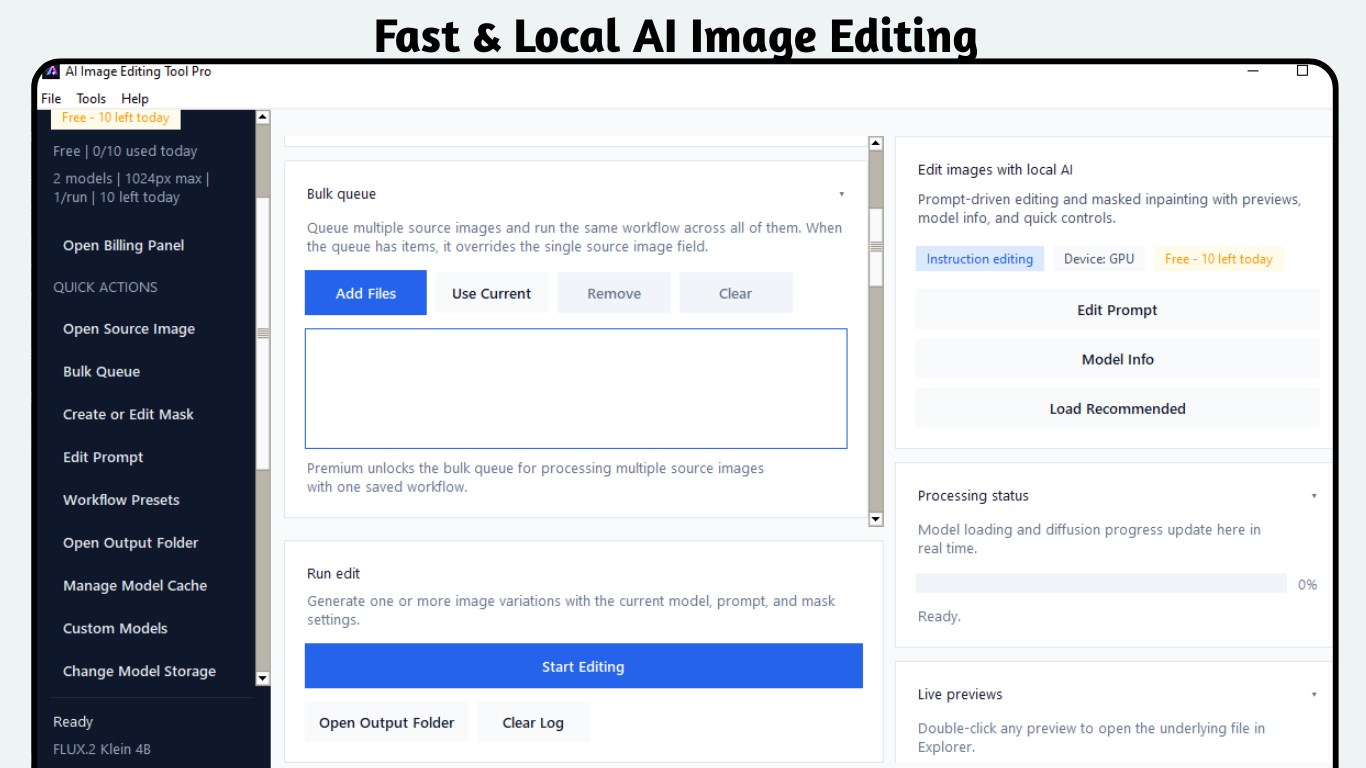
Fast AI Local Image Editing
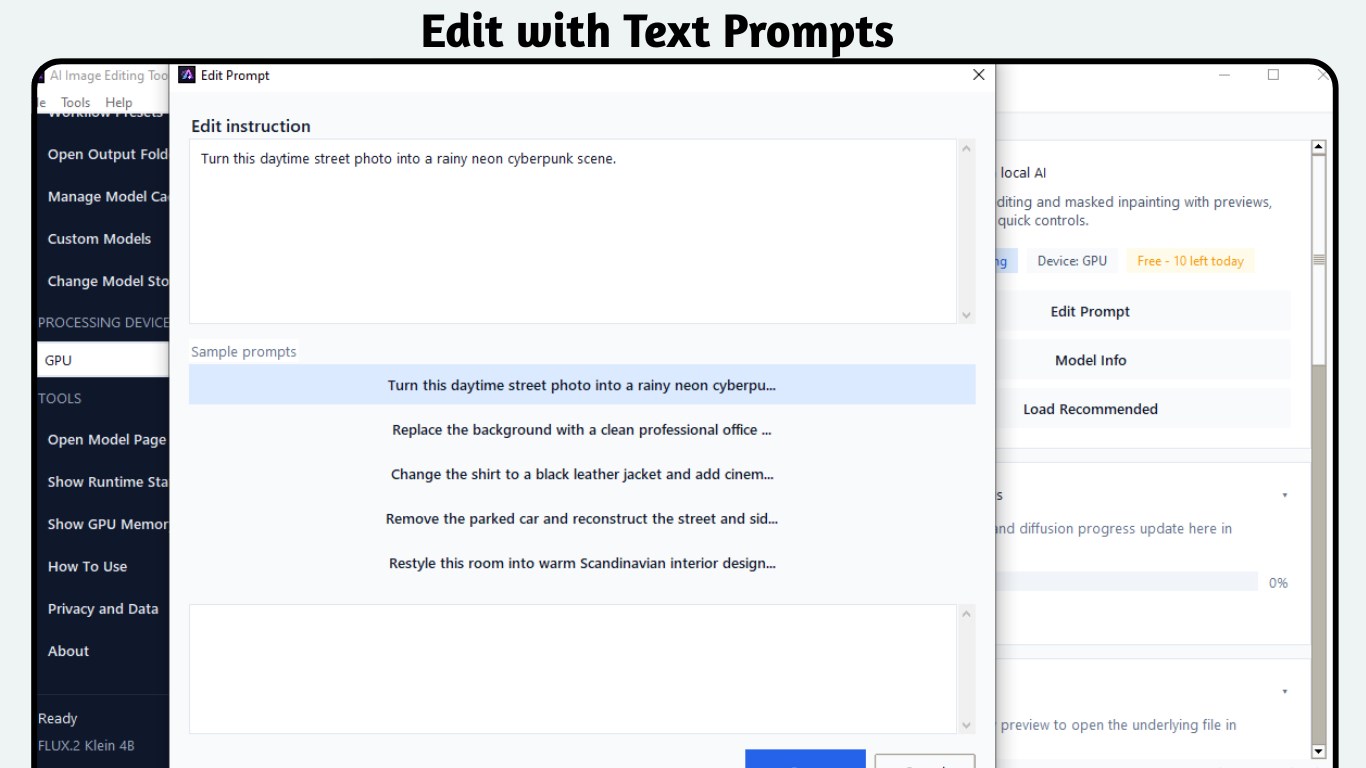
Text Prompt Editing
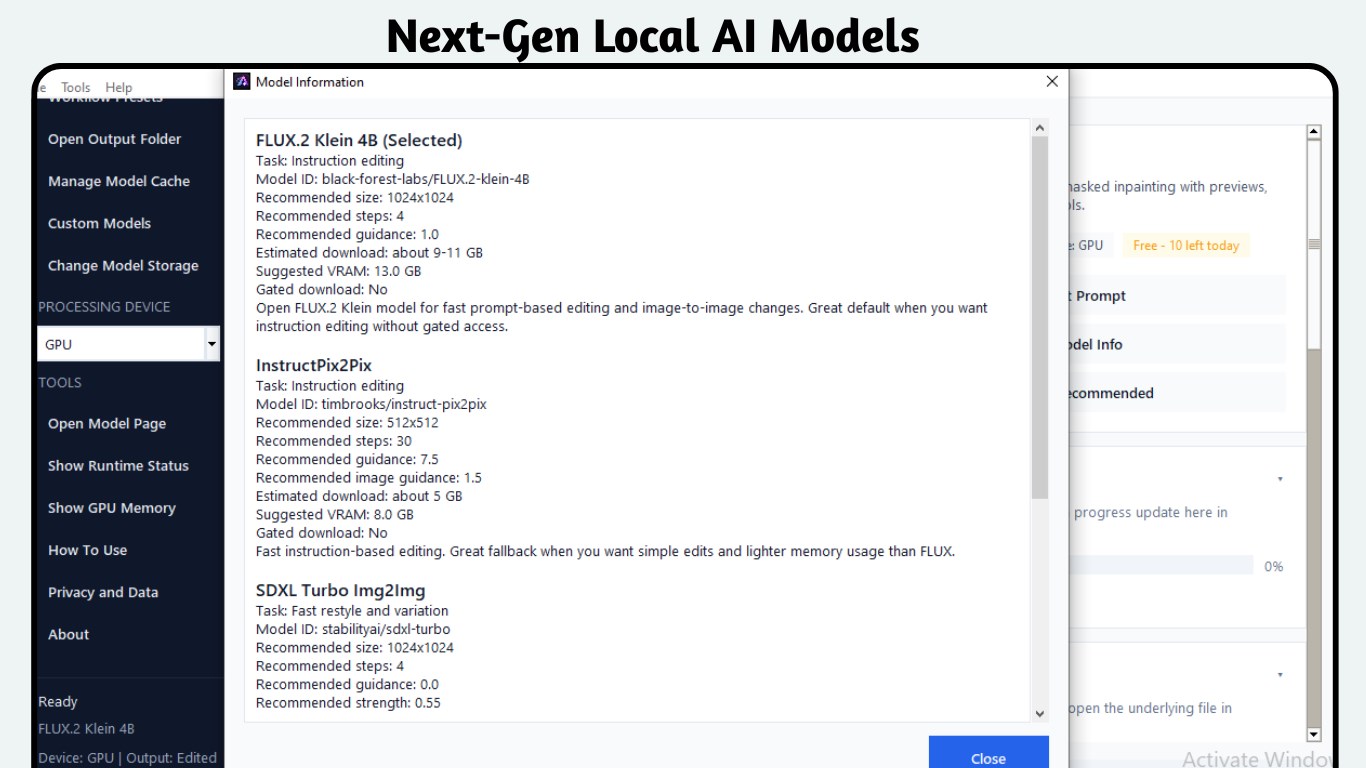
Next-Gen AI Models
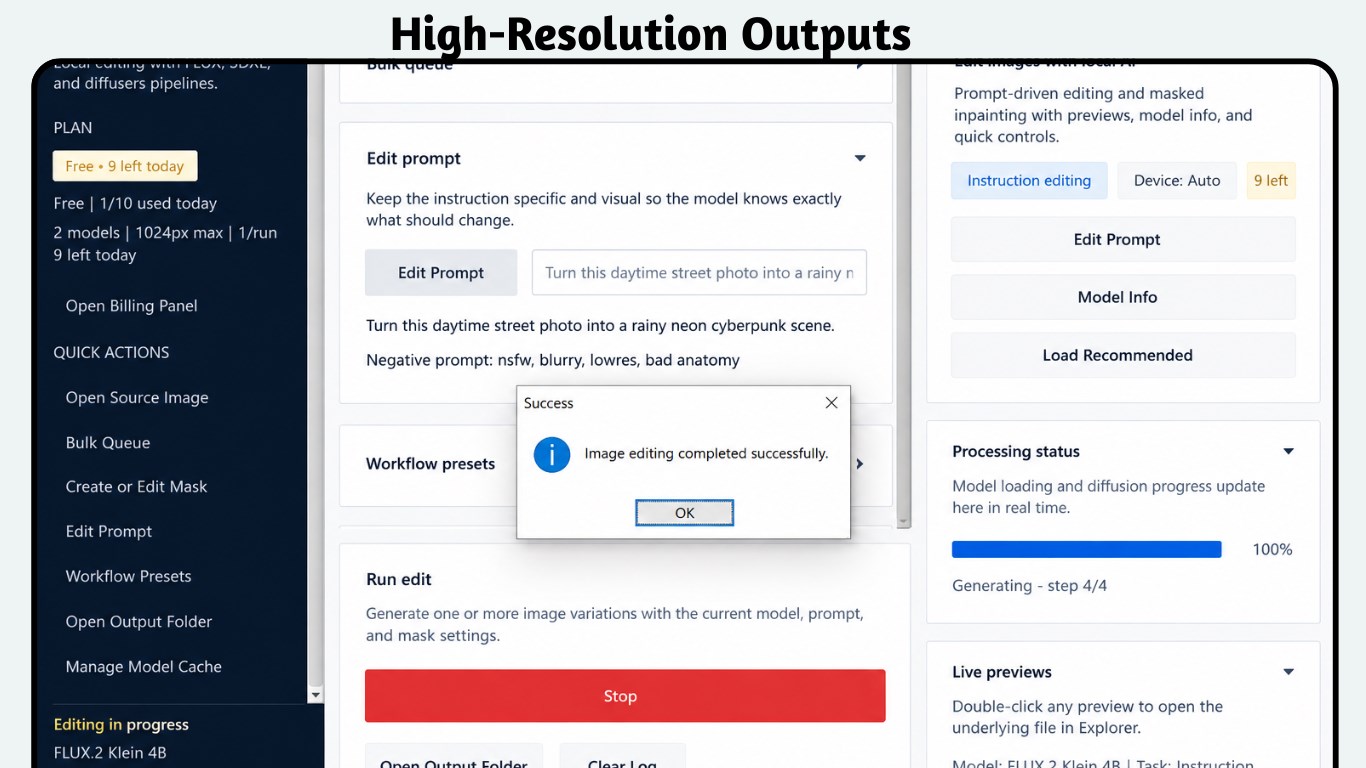
High-Resolution Outputs
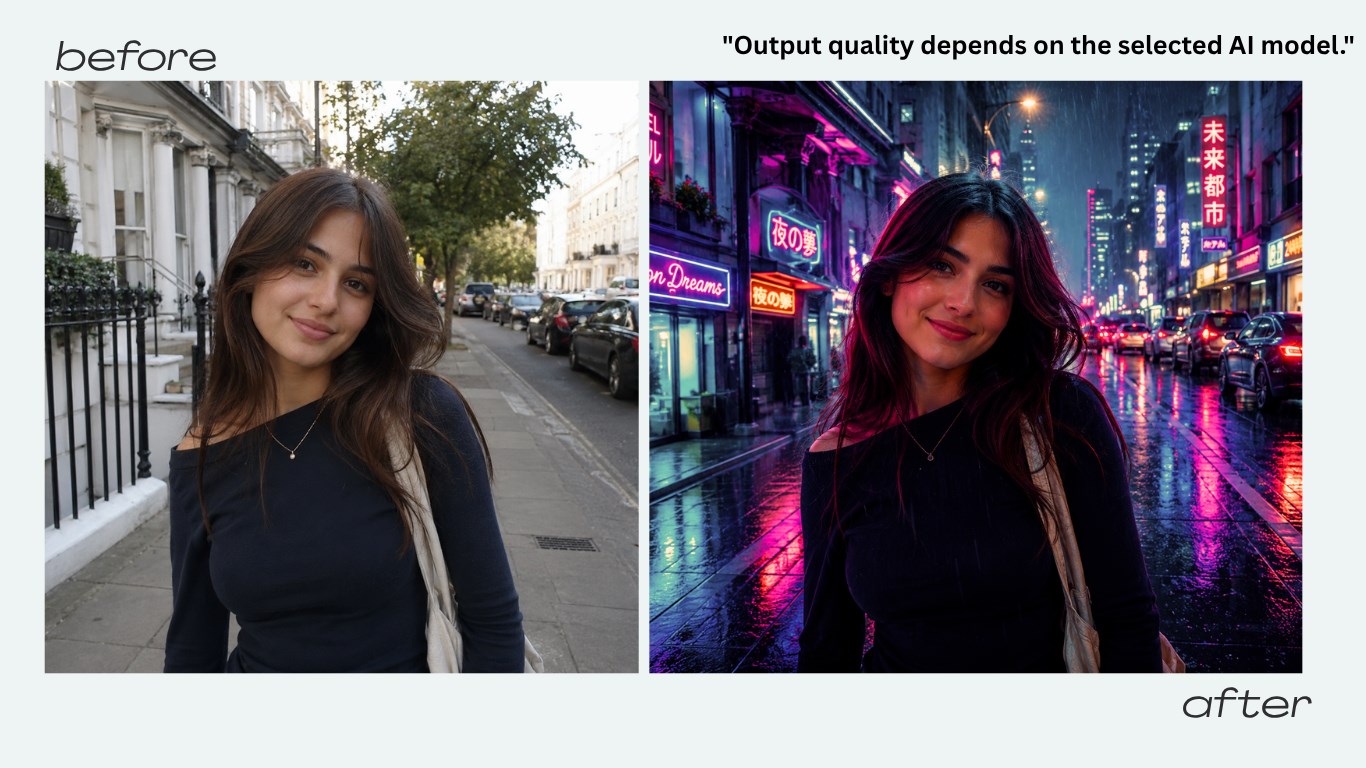
Before & After Results
Frequently Asked Questions
Is my data truly private? Are my images sent to the cloud?
No. The entire AI pipeline runs locally on your PC’s GPU or CPU. Your source images, mask data, and text prompts are never uploaded, analyzed, or stored on any remote server. Your files stay completely on your own hard drive.
What is the difference between the free plan and Pro?
The free plan gives you 10 AI image edits per day with core model access. The Premium upgrade removes the daily limit for unlimited generations, unlocks bulk queue batch processing, grants access to advanced and custom AI models, and enables high-resolution outputs up to 4096px.
What is masked inpainting and how does it work?
Inpainting lets you surgically edit specific parts of an image. Use the built-in Mask Editor to paint over the region you want to change — a background, an object, a person — and enter a text prompt describing what to replace it with. The AI reconstructs only the masked area while leaving the rest of your image untouched.
Do I need an NVIDIA GPU?
An NVIDIA GPU with CUDA support is highly recommended for fast, responsive generation speeds. The app does run on CPU only, but processing times will be significantly longer. For the best experience, a dedicated GPU is strongly advised.
How does bulk queue processing work?
With a Pro subscription, you can load multiple source images into the queue and apply the same editing prompt, model settings, and parameters across all of them in one automated batch run. This is ideal for e-commerce sellers, photographers, and content teams editing large sets of images consistently.
Can I cancel my Pro subscription at any time?
Yes. Pro subscriptions are managed through your Microsoft Store account and can be cancelled at any time. You retain Pro access until the end of your current billing period, then revert to the free plan with 10 edits per day.
Transform Your Photos with Local AI Today
Start free with 10 edits a day — no cloud, no subscriptions required to begin.
Download Free — 10 Edits/Day Go Pro — Premium upgrade via Microsoft Store