Intelligent Navigation
The AI reads pages, finds the right buttons, inputs text, bypasses popups, and handles multi-step forms.
Automate any web task with AI — navigate, click, download, and schedule on autopilot.
Completely free — no purchase, no subscriptions, no recurring fees. Install on up to 10 Windows devices.
Think about how much of your working day involves opening the same websites, logging in, clicking through the same sequence of menus, downloading the same reports, and repeating the same data-entry steps that a reasonably attentive person could do in their sleep. AI Auto Browser was designed to reclaim that time. It is a Windows desktop application that connects a real, controllable web browser to the reasoning power of large language models, giving you an agent that reads web pages the way a human does — understanding layout, context, and intent — and then acts on them with reliable precision.
The application supports a bring-your-own-key model, meaning you connect whichever AI provider you already trust: OpenAI, Anthropic, Google Gemini, Groq, DeepSeek, or a locally running Ollama instance for those who want zero external API calls. Once connected, you describe a task in plain English — "log into my analytics dashboard, download last week's CSV report, and save it to my Desktop" — and the agent works through every step independently. It handles cookie consent banners, navigates pagination, deals with dynamic JavaScript-heavy pages, and recovers from unexpected page states without needing hand-holding.
Persistent browser sessions mean that once you have authenticated with a site, the agent can return to it on a schedule — daily, weekly, or at a custom interval you define — without prompting you for login credentials each time. Your session data, API keys, and task history never leave your machine; they are stored and protected within your local Windows environment. This combination of automation power and local-first privacy makes AI Auto Browser a uniquely capable tool for professionals who need reliable web automation without the security trade-offs of cloud-based RPA platforms.
The AI reads pages, finds the right buttons, inputs text, bypasses popups, and handles multi-step forms.
Connect OpenAI, Anthropic, Gemini, Groq, DeepSeek, or run fully offline with Ollama.
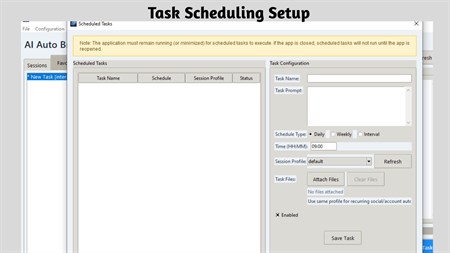
Set tasks to run daily, weekly, or at custom intervals in the background.
Log in once — the browser remembers your session so the AI can act on authenticated sites.
Automatically captures downloads and can upload them in subsequent workflow steps.
Record automated sessions as video for easy auditing and debugging.
Monitor competitor prices or track metrics on any website automatically.
Schedule daily report downloads from dashboards and portals.
Schedule social media uploads and interactions.
Automate repetitive web forms, registrations, and data entry.
For teams and power users, the video recording feature provides a verifiable audit trail of every automated session. You can review exactly which elements the agent interacted with, which buttons were clicked, and how each page responded — invaluable for debugging workflows or demonstrating compliance. The visual element highlighting, which outlines every object the AI is about to interact with in real time, adds an additional layer of transparency that traditional automation scripts completely lack.
OpenAI (GPT-4), Anthropic (Claude), Google (Gemini), Groq, DeepSeek, and local Ollama models for fully offline use.
Yes — persistent browser profiles keep you logged in so the AI can perform tasks on authenticated sites.
Yes — with optional headless browser mode, tasks run silently in the background.
All API keys, chat history, and session data are stored securely on your local Windows machine only.
Yes — it auto-detects downloads and can use them as inputs for subsequent steps in a workflow.
Platform: Windows 10 version 17763.0 or higher
Memory: 4 GB (min), 8 GB (rec)
App Size: 271.7 MB
Developed by: Bytesweavers
Completely free — yours forever, on up to 10 Windows devices.
Sort, rename, and clean folders with AI-assisted file organisation.
Create polished captions with local Whisper models and styled exports.
Push images to 2× or 4× with specialised Real-ESRGAN models.
Transcribe meetings, create local summaries, and export what matters.