Load Image
Open the photo you want to clean.
Offer🔥 Limited-Time Special Pricing — Get AI Image Watermark Remover Pro at the current special price.
Erase watermarks, logos, text, and date stamps from any photo.
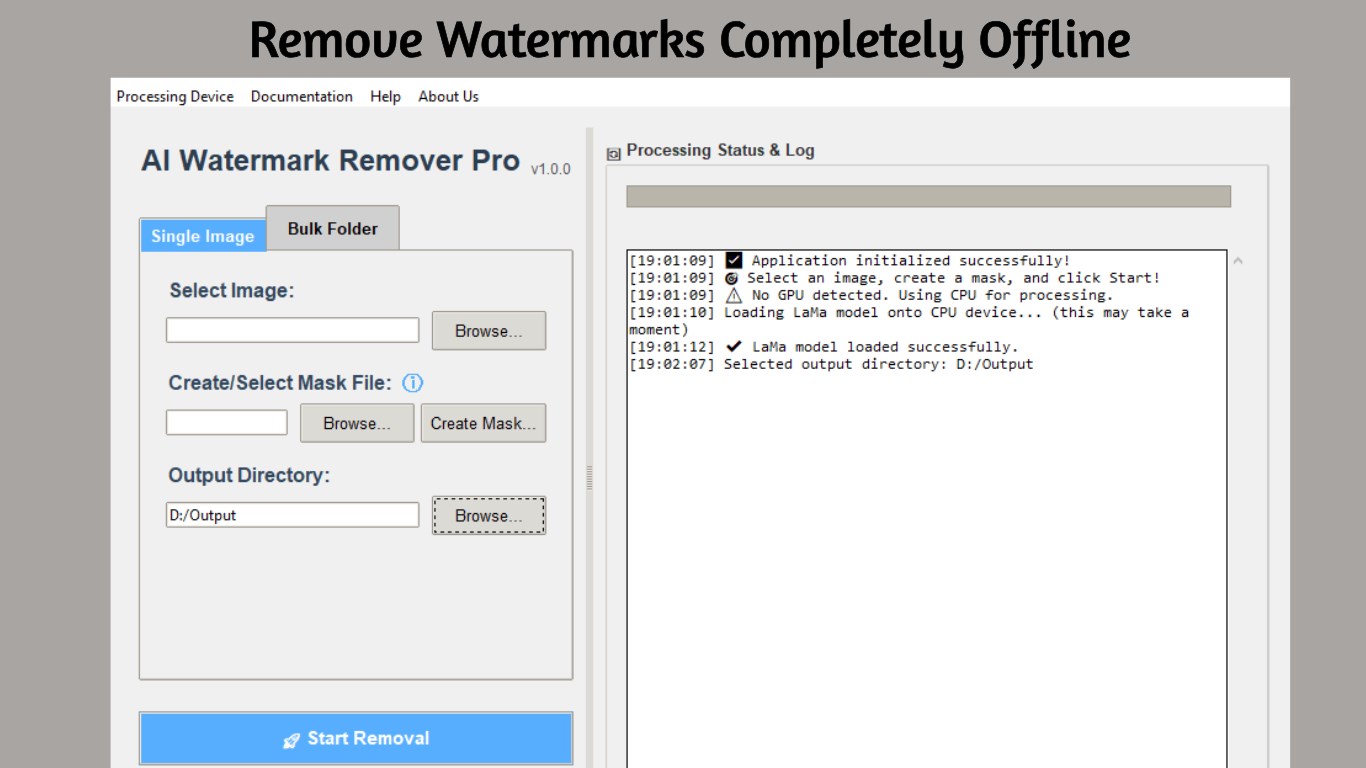
Reclaim your photos and get perfectly clean results at the current special price.
Tired of distracting watermarks, logos, or text cluttering your photos? AI Image Watermark Remover Pro is your specialized solution. Powered by advanced AI inpainting technology, this app intelligently removes any unwanted element and reconstructs the background with stunning accuracy, as if it was never there.
Unlike online tools that compromise your privacy, our app works completely offline. Your images are never uploaded to a server, giving you total security and peace of mind. Perfect for photographers, designers, and content creators who need clean, professional images.
Our powerful Mask Editor gives you the pixel-perfect control needed for clean, professional results. The process is simple and intuitive.
Open the photo you want to clean.
Use the brush tool to carefully paint over the watermark, logo, or text. Use the zoom and eraser tools for ultimate precision.
Click the process button and let the AI analyze the surrounding pixels and intelligently fill in the masked area.
Intelligently removes unwanted objects and realistically rebuilds the background, avoiding the smudges and artifacts of older tools.
Apply one mask to an entire folder of images to process hundreds of photos automatically. Perfect for stock photo collections.
Leverages NVIDIA CUDA-enabled GPUs for significantly faster performance, with a reliable fallback to CPU processing.
Erase any type of watermark, from subtle text to complex, semi-transparent logos.
Clean up old scanned photos or downloaded images with unwanted text overlays or date stamps.
Repair old photographs by seamlessly removing scratches, dust, blemishes, and skin imperfections.
While specialized, it's also highly effective at removing any small, unwanted background objects.
Yes! AI Image Watermark Remover Pro works 100% offline. All processing happens locally on your computer. Your images are never uploaded to any server, ensuring complete privacy and security.
The app uses advanced AI inpainting technology that analyzes the surrounding pixels around your masked area. It then intelligently generates new content to fill in the gap, matching textures, colors, and patterns for a seamless result.
Yes! The bulk processing feature lets you apply a single mask to an entire folder of images. This is perfect for stock photo collections or product catalogs where the watermark is in the same position on every image.
The app can remove text watermarks, logo overlays, date stamps, copyright notices, and semi-transparent watermarks. It works best on watermarks that don't cover the main subject of the photo.
The app supports all common image formats including PNG, JPG, JPEG, BMP, TIFF, and WebP. Output will be saved as PNG.
A GPU is not required but recommended for faster processing. The app supports NVIDIA CUDA GPUs for acceleration, but will work on CPU if no compatible GPU is available. Processing on CPU takes longer but produces the same quality results.
Absolutely! The AI inpainting technology is perfect for photo restoration. You can remove scratches, dust spots, blemishes, and other imperfections from old photographs by masking them and letting the AI fill in the details.
Requires Windows 10 version 1903 or higher, or Windows 11. Minimum 4GB RAM (8GB recommended). An NVIDIA GPU with CUDA support is optional but recommended for faster processing.
Stop letting unwanted elements distract from your photos at the current special price.
Sort, rename, and clean folders with AI-assisted file organisation.
Create polished captions with local Whisper models and styled exports.
Push images to 2× or 4× with specialised Real-ESRGAN models.
Transcribe meetings, create local summaries, and export what matters.