
20-20-20 Eye Protector
Reduce eye strain and build lasting healthy screen habits — your silent, private break reminder for Mac.
Mac App • Smart Break Timer • Strict Mode • Usage Statistics • 100% Private
Download on the Mac App Store
One purchase, lifetime protection. Give your eyes the break they deserve — no subscriptions, no cloud, no data collection.
Buy 20-20-20 Eye Protector — $19.99One-Time Purchase No Subscriptions Data Never Leaves Your Mac
Your Silent Partner for Healthy Screen Habits
Staring at a screen for hours leads to digital eye strain, fatigue, and headaches. 20-20-20 Eye Protector automates the optometrist-recommended 20-20-20 rule seamlessly into your macOS workflow — running quietly in your menu bar, reminding you exactly when to rest, and tracking your screen habits over time.
With zero cloud syncing, no account required, and no third-party trackers of any kind, your usage data stays exactly where it belongs — on your own Mac. One $19.99 purchase is all it takes to build a healthier relationship with your screen, for life.
Key Features
Smart Countdown Timer
A beautiful, unobtrusive 20-minute timer lives in your menu bar and reminds you exactly when it’s time to rest your eyes. Easily pause, reset, or set a custom duration to match your work rhythm.
Strict Mode
Need extra discipline? Enable Strict Mode to enforce a full 20-second break with an un-skippable countdown — ensuring your eyes actually get the rest they need, not just a dismissed notification.
Snooze & Auto-Start
Allow a 5-minute snooze when you’re in deep focus — without throwing off your whole schedule. Set breaks and timers to start automatically so healthy habits require zero manual effort.
Usage Statistics & Insights
Track your daily computer uptime and view your screen habits over the last 7, 30, or 90 days with beautiful interactive charts. Export all data to CSV at any time for your own analysis.
Customizable Notifications
Personalize your break reminder text to keep yourself motivated. Whether it’s a gentle nudge or a firm instruction, make the reminder feel like yours.
Launch at Login
Set it and forget it. The app starts silently in your Mac’s menu bar the moment you log in, ensuring healthy habits are protected from day one — every single day.
100% Private & Local-First
No account creation, no cloud syncing, no third-party analytics. All settings and usage statistics are stored locally and securely on your device. Your data belongs to you.
Mac Menu Bar App
Lives quietly in your menu bar without cluttering your Dock. Always present, never intrusive — protecting your vision silently in the background while you work.
Screenshots
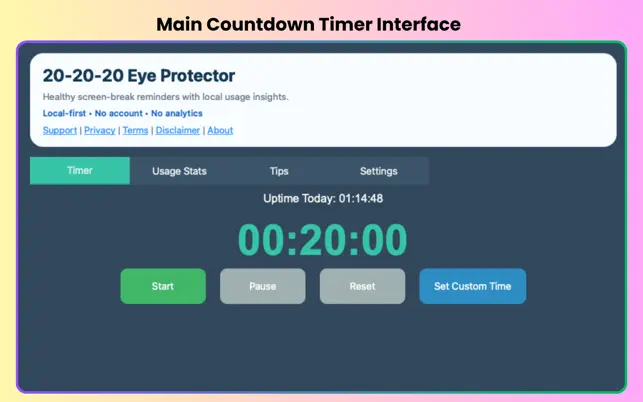
Main Countdown Timer
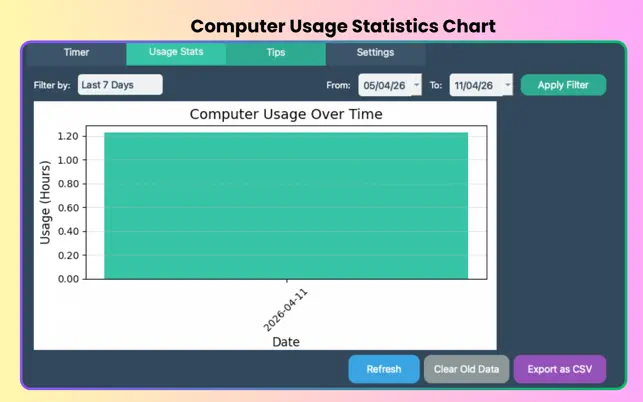
Computer Usage Statistics
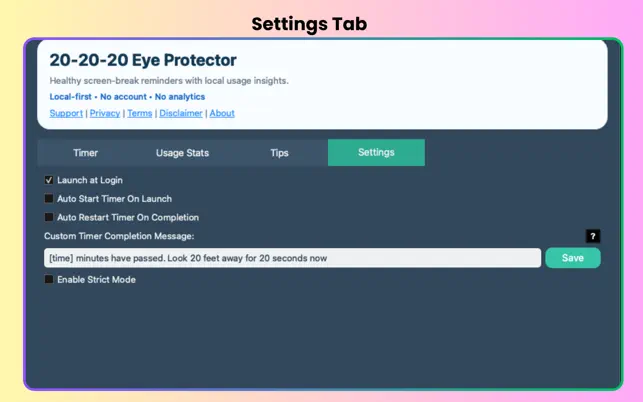
Customizable Settings
Who is it For?
- Programmers & Developers: Long coding sessions are a prime cause of digital eye strain — automate your breaks without breaking your flow.
- Writers & Content Creators: Maintain focus and freshness through long writing sessions with gentle, timely reminders.
- Students: Build healthy screen habits early during study sessions, lectures, and research.
- Designers: Protect your eyes during pixel-perfect detail work that demands extended screen time.
- Anyone Using a Mac Daily: If you spend more than 2 hours a day on your Mac, your eyes will thank you.
App Details & Requirements
- Platform: Mac only
- macOS: macOS 12.0 (Monterey) or later
- Chip: Apple M1 or later (required)
- Size: 40.8 MB
- Price: $19.99 — one-time purchase, no subscriptions
- Age Rating: 4+
- Developer: Manish Kapoor / Bytesweavers
- Category: Utilities
Frequently Asked Questions
Is this a one-time purchase or a subscription?
One-time purchase at $19.99. Once you buy it from the Mac App Store, you own it forever with all future updates included. No monthly fees, no annual renewals.
Is my usage data sent anywhere?
No. The developer has confirmed that no data is collected from this app. There are no accounts, no cloud syncing, and no third-party analytics trackers. Your usage statistics and settings are stored entirely on your Mac.
What is Strict Mode?
Strict Mode enforces a full 20-second break with an un-skippable countdown overlay. Unlike a regular notification you can dismiss immediately, Strict Mode ensures your eyes actually complete the break — ideal for people who tend to ignore or skip reminders when in work mode.
Can I customize the break interval?
Yes. While the default follows the standard 20-minute rule, you can set a custom interval duration to suit your personal workflow and screen time habits.
How does usage statistics work?
The app tracks your daily computer uptime locally and presents it in beautiful interactive charts covering the last 7, 30, or 90 days. You can export all of your historical usage data to a CSV file at any time for your own records or analysis.
Does this work on Intel Macs?
No. The app requires Apple Silicon (M1 or later) and macOS 12.0 or later. It is not compatible with Intel-based Macs.
Give Your Eyes the Break They Deserve
One $19.99 purchase. A lifetime of healthier screen habits. No cloud, no subscriptions, no compromise.
Buy 20-20-20 Eye Protector — $19.99 on Mac App Store