
AI Photo Upscaler
Enhance, unblur, and upscale your photos up to 4x — powered by Real-ESRGAN AI running 100% on your device.
iPhone & iPad App • Apple Neural Engine • Real-ESRGAN Core ML • 100% Offline
Download on the App Store
Upscale photos for free with 2x and 4x resolution enhancement. Upgrade to Pro for bulk processing of up to 10 images.
Download Free — 2x & 4x Upscaling Go Pro — $5.99/mo or $29.99/yrNo Cloud Uploads Apple Neural Engine iOS 17.0+
Desktop-Class AI Upscaling — Right on Your iPhone
Transform your low-resolution, blurry, or old photos into crisp, high-definition images in seconds. AI Photo Upscaler uses a state-of-the-art Real-ESRGAN Core ML model optimized specifically for iOS, tapping into your device’s GPU and Apple Neural Engine to deliver desktop-class upscaling performance — without uploading a single pixel to the cloud.
Unlike other photo enhancers that send your personal images to remote servers, AI Photo Upscaler processes everything locally on your iPhone or iPad. No internet connection required, no cloud processing, and absolute privacy guaranteed — your memories stay yours.
Choose Your Export Resolution
Pick the upscaling factor that fits your needs — maximum quality at 4x or a balanced smaller file at 2x.
Free & Pro Plans
Start upscaling for free with both 2x and 4x resolution modes. Upgrade to Pro to batch-process up to 10 images at once with auto-save.
Free
No credit card. Download and enhance immediately.
- 4x AI upscaling — maximum resolution boost
- 2x lightweight export — manageable file sizes
- Before & after comparison slider
- Import from Photos, Files, or Camera
- Save to Photos or share via Share Sheet
- Powered by Real-ESRGAN Core ML model
- Apple Neural Engine GPU acceleration
- 100% offline & private — no cloud uploads
Pro
or $29.99/year (save 58%)
Auto-renewing. Manage anytime via App Store.
- Everything in the Free plan
- Bulk Upscaling: process up to 10 images simultaneously
- Set it and forget it — device handles the heavy lifting
- Auto-Save: enhanced results save automatically to your Photos library
- Maximum workflow efficiency for photographers and power users
- Priority feature updates
Key Features
100% Offline & Private
Every pixel stays on your device. Unlike cloud-based enhancers that upload your personal photos to external servers, AI Photo Upscaler processes everything locally with no internet connection required.
Real-ESRGAN Core ML
Powered by a highly optimized Real-ESRGAN model compiled specifically for iOS Core ML. The same neural network architecture trusted by professionals worldwide — now running natively on your iPhone.
Apple Neural Engine
Automatically taps into your device’s GPU and Apple Neural Engine for lightning-fast upscaling. Delivers desktop-class performance without draining your data plan or overheating your device.
4x AI Resolution Boost
Breathe new life into pixelated, cropped, or low-resolution photos by quadrupling their resolution. Recover lost detail in old family photos, zoomed-in crops, or downloaded images.
Before & After Slider
Instantly compare the original and AI-enhanced versions of your photo side-by-side with an interactive slider. See exactly how much detail the AI recovered before saving.
Export Size Selection
Choose between 4x for the highest possible output resolution, or 2x for a lighter file size that still benefits from full AI enhancement — perfect for sharing on social media or messaging apps.
Bulk Upscaling Pro
Select up to 10 images at once and let the app process them all simultaneously in the background. Set it running and step away — results are delivered automatically when complete.
Auto-Save to Photos Pro
Batch-enhanced results save automatically to your Photos library without requiring any manual export action per image — the ultimate hands-free workflow for processing large sets of photos.
Screenshots
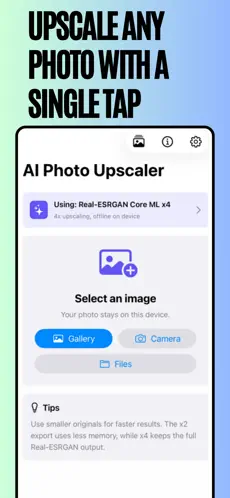
Single Tap Upscale
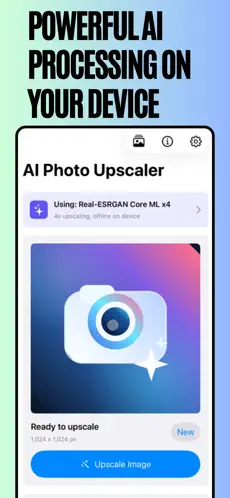
On-Device Processing
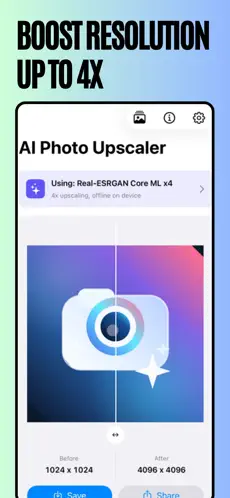
Boost up to 4x
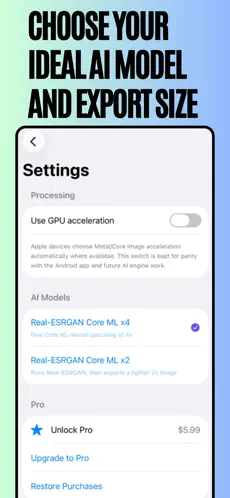
Export Size & Model
Who is it For?
- Photographers: Recover fine detail in compressed or cropped shots without sending originals to the cloud.
- Memory Preservers: Restore old, scanned, or low-resolution family photos to crisp high-definition quality.
- Digital Artists: Upscale downloaded artwork, wallpapers, and reference images to print-ready resolutions.
- Social Media Creators: Enhance photos for Reels, Stories, and posts that demand sharp, high-quality visuals.
- Privacy-Conscious Users: Enhance sensitive personal photos without any cloud exposure at any point.
App Details & Requirements
- Platform: iPhone & iPad
- iOS: iOS 17.0 or later required
- Size: 69.3 MB
- Price: Free — Pro $5.99/mo or $29.99/yr
- Age Rating: 4+
- Developer: Manish Kapoor / Bytesweavers
- Category: Photo & Video
Frequently Asked Questions
Are my photos uploaded to a cloud server?
Never. The developer has confirmed that no data is collected. The entire Real-ESRGAN model runs locally using Core ML on your device’s Neural Engine and GPU. Your photos never leave your iPhone or iPad at any point during processing.
What is the difference between 2x and 4x export?
Both apply the same full AI enhancement process. The difference is the output file size: 4x produces the highest possible resolution ideal for printing or detailed viewing, while 2x outputs a smaller, more manageable file that retains the AI quality improvements — perfect for sharing on social media or messaging.
How does bulk upscaling work in Pro?
With a Pro subscription, select up to 10 images from your Photos library or Files app. The app processes them all simultaneously using your device hardware, then auto-saves every enhanced result directly to your Photos library — completely hands-free once initiated.
What types of photos benefit most from upscaling?
Old scanned family photos, heavily cropped images, screenshots, downloaded or web-sourced images, and any photo that appears pixelated or lacks sharp detail. The Real-ESRGAN AI intelligently reconstructs textures and edges rather than simply stretching pixels.
Can I cancel my Pro subscription?
Yes. Subscriptions are managed via your Apple Account in the App Store and can be cancelled at any time. You retain Pro access until the end of your current billing period, then revert to the free plan with single-image upscaling.
Bring Your Photos to Life — Privately
AI-powered 4x upscaling on your iPhone. No cloud, no cost to start, no compromise on privacy.
Download Free on App Store Go Pro — $5.99/mo or $29.99/yr