
Offline AI Image Upscaler
Enhance and upscale your photos with AI — sharper details, higher resolution, 100% on-device processing.
Free Android App • Ads + In-App Purchases • AI Upscaling • 71 MB
Download Offline AI Image Upscaler
Free with Ads • In-App Purchases available • Available on Google Play Store
Download Free on Google PlayAndroid 8.0+ 71 MB 100+ Downloads
About Offline AI Image Upscaler
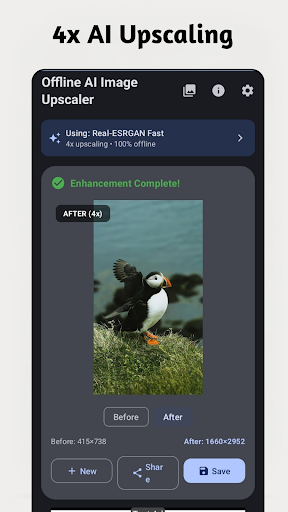
Photography on smartphones has advanced tremendously over the past decade, but the enormous archive of older images that most people carry on their devices — photos taken on basic cameras, WhatsApp images compressed repeatedly during forwarding, screenshots captured at screen resolution, or old prints digitised on a flatbed scanner — remains locked at its original low quality. Offline AI Image Upscaler applies super-resolution technology to these images directly on your Android device, producing outputs that are sharper, more detailed, and more suitable for printing or large-screen display than their originals.
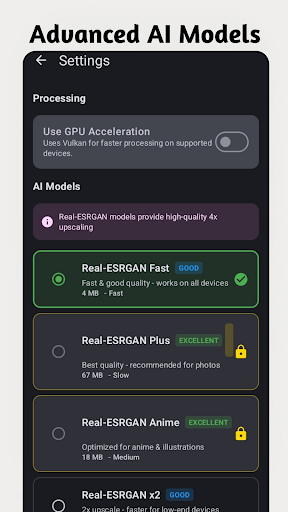
The technology behind the application is fundamentally different from simple bicubic interpolation, which is what basic “resize” tools use. Super-resolution AI models are trained on enormous datasets of high and low resolution image pairs, learning to reconstruct plausible fine detail — texture, edges, fine structures — in ways that mathematically-derived scaling algorithms cannot. The result is an image that is not just larger, but genuinely contains more perceived detail than the input, even though that detail is intelligently inferred rather than literally present in the source file.
All of this processing happens on the device itself, with no internet connection required and no images uploaded to any server. This is a meaningful distinction for users handling personal photographs — family memories, private images, identification documents — where sharing data with a cloud service is neither desirable nor appropriate. The app’s on-device AI pipeline delivers professional-quality results with the same unconditional privacy that offline software has always offered.
Key Features
100% Offline Processing
All AI upscaling runs on your device. Your photos are never uploaded to any server.
AI Super Resolution
Enhance image resolution using advanced AI models for sharper, more detailed results.
Multiple Scale Options
Choose from different upscaling factors to balance quality and file size.
Batch Processing
Upscale multiple photos at once to save time.
High-Quality Export
Save enhanced images in full quality directly to your gallery.
Simple Interface
Clean, intuitive UI — import a photo, choose scale, and enhance with one tap.
Who Is It For?
Old Photo Restoration
Enhance blurry or low-resolution old photos and memories.
Print Preparation
Upscale digital photos before printing to avoid pixelation.
Social Media
Improve photo quality before sharing on Instagram, Facebook, or WhatsApp.
Professional Use
Enhance product images for listings or presentations.
Why Choose Offline AI Image Upscaler?
The use cases extend well beyond personal photo restoration. Product sellers on platforms like Amazon and Flipkart who need to present items visually but only have low-resolution source images can use the tool to improve listing quality without a professional photography reshoot. Social media users who want to share older photos without the visual quality being a distraction will find the enhancement immediately impactful. Students and professionals preparing presentation materials from image sources that were captured at inadequate resolution will appreciate having a capable, private enhancement tool available directly on their phone.
Screenshots

Screenshot 1
Screenshot 2
Screenshot 3

Screenshot 4
Frequently Asked Questions
Does it work offline?
Yes — all AI processing is done on your device. No internet required and no photos uploaded.
What upscaling factors are available?
Multiple options are available. The specific factors depend on your device’s processing capability.
What image formats are supported?
Common formats including JPG and PNG are supported for both input and output.
Is there a free version?
Yes — the app is free to download with ads. In-app purchases are available for premium features.
What Android version is required?
Android 8.0 (Oreo) or higher is required.
App Information
Platform: Android 8.0+
Download Size: 71 MB
Downloads: 100+
Developed by: Bytesweavers
Pricing: Free with Ads • In-App Purchases available
Download Offline AI Image Upscaler
Available Free with Ads • In-App Purchases available on Google Play.
Get It on Google Play