
Offline Image Compressor
Compress images to a fraction of their size without losing quality — 100% offline, blazing fast.
Free Android App • Contains Ads • Batch Compression • 22 MB
Download Offline Image Compressor
Free • Contains Ads • Available on Google Play Store
Download Free on Google PlayAndroid 7.0+ 22 MB 100+ Downloads
About Offline Image Compressor
Every photograph taken on a modern smartphone is a surprisingly large file. A single image captured at full resolution on a mid-range device can easily exceed five megabytes. For users who regularly share photos via WhatsApp, email, or social platforms, this creates constant friction: slow upload times, messages that take too long to send, email attachments that bounce against size limits, and a device storage that fills up faster than expected. Offline Image Compressor gives Android users a simple, fast, and private way to reduce image file sizes substantially — by as much as ninety percent in some cases — without producing output that looks noticeably degraded at normal viewing sizes.
The compression engine runs entirely on the device, which matters for several reasons. Users who handle images containing personal information — photographs of identity documents, medical reports, private correspondence — should not have to send those images to an external server to reduce their file size. The offline approach eliminates that concern entirely. Every compression job is processed locally, the output is saved to your gallery or a folder of your choosing, and no data is transmitted anywhere. The experience is fast, direct, and private by architecture rather than by policy.
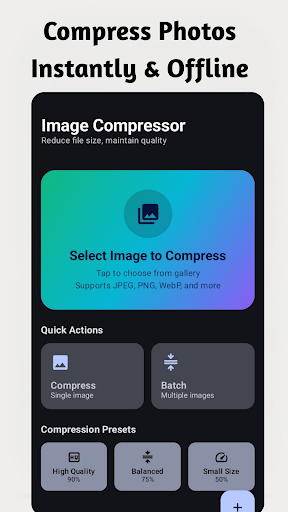
The batch mode is the feature that saves the most time for users with large existing photo libraries or regular compression workflows. Rather than processing images one at a time, you can select a folder or a group of photos and compress the entire set in a single operation. The quality slider gives you control over the trade-off between file size and visual fidelity — at higher quality settings, the size reduction is more modest but the output is virtually indistinguishable from the original at typical screen sizes; at lower settings, file sizes drop dramatically with minor visible softening that most messaging and web use cases would never flag as a problem.
Key Features
100% Offline
No images are ever uploaded. All compression happens locally on your device.
Batch Compression
Compress multiple images at once — process entire albums in seconds.
Quality Control
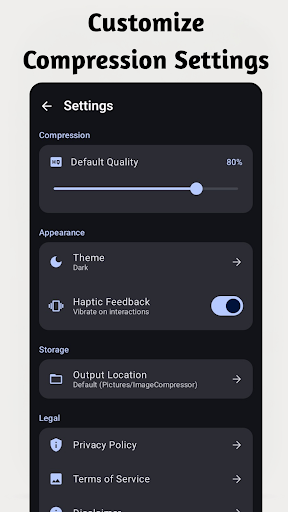
Choose your desired quality level to balance file size reduction vs. visual fidelity.
Significant Size Reduction
Reduce image file sizes by up to 90% while maintaining acceptable visual quality.
Flexible Export
Save compressed images to a custom folder or share directly via any app.
Lightweight
Only 22 MB — runs smoothly on all Android 7.0+ devices.
Who Is It For?
WhatsApp & Messaging
Compress photos before sending to reduce data usage and send faster.
Email Attachments
Shrink image attachments to stay within email size limits.
Storage Saving
Free up phone storage by compressing large photo libraries.
Website Images
Compress images before uploading to websites or blogs for faster loading.
Why Choose Offline Image Compressor?
Website owners and bloggers who manage content on mobile will find the application particularly useful. Large image files are one of the most common causes of slow page load times, and compressing images before uploading them — rather than relying on the CMS or CDN to handle optimisation — gives direct control over the quality-size balance and reduces the bandwidth load on every visitor. With one hundred or more downloads and an actively maintained codebase, Offline Image Compressor has already earned a place in the daily workflow of users who value a tool that does one thing and does it reliably.
Screenshots
Screenshot 1

Screenshot 2

Screenshot 3

Screenshot 4

Screenshot 5
Screenshot 6
Frequently Asked Questions
Does it work offline?
Yes — completely offline. No images are ever sent to a server.
How much can it compress?
Depending on the original image and quality setting, file sizes can be reduced by up to 90%.
Does compression affect image quality?
You control the quality level. Higher settings preserve more quality with less compression.
Can I compress multiple images at once?
Yes — batch mode lets you compress entire folders or selections at once.
What image formats are supported?
JPG and PNG are fully supported for compression.
App Information
Platform: Android 7.0+
Download Size: 22 MB
Downloads: 100+
Developed by: Bytesweavers
Pricing: Free • Contains Ads
Download Offline Image Compressor
Available Free • Contains Ads on Google Play.
Get It on Google Play